
理解 REST API 中的 populate 参数
页面摘要: REST API 查询中的
populate参数会在默认属性之外,将额外的字段、关联、组件和动态区域包含进响应中。使用populate=*可联表加载(populate)所有 1 层深度的关联,或者使用嵌套数组和 fragment(片段)语法显式指定字段,以进行更深层次或有选择性的联表加载。
本页内容可能尚未完全与 Strapi 5 同步:
- 所有概念性信息和解释都是正确的,并且是最新的。
- 但是,在示例中,响应内容可能略有不同。
这些示例将在 Strapi 5.0.0(稳定版)发布之后,并且 FoodAdvisor 示例应用升级到 Strapi 5 之后,才会完全更新。
不过,响应示例略有不同,不应影响你掌握本页所教授的核心概念。
当使用 Strapi 的 REST API 查询内容类型时,默认情况下,响应只包含顶层字段,不包含任何关联、媒体字段、组件或动态区域。
在 Strapi REST API 的语境下,联表加载(populating)是指:通过在默认返回的字段之外返回更多字段,将额外的内容包含进你的响应中。你可以使用 populate 参数 来实现这一点。
在本指南中,示例均使用随 FoodAdvisor 示例应用一起提供的服务端中真实查询到的数据构建。若要自行测试示例,请搭建 FoodAdvisor,在 /api/ 文件夹中启动服务端,并在发送查询之前,确保为所查询的内容类型授予了适当的 find 权限。
本指南将详细解释以下使用场景:
- 联表加载所有字段和关联,深度为 1 层,
- 联表加载部分字段和关联,深度为 1 层,
- 联表加载部分字段和关联,深度为多层,
- 联表加载组件,
- 联表加载动态区域。
联表加载多层深度通常被称为“深度联表加载(deep populate)”。
除了在查询中以各种方式使用 populate 参数之外,你还可以构建一个自定义控制器作为变通方法,来联表加载 creator 字段(例如 createdBy 和 updatedBy)。这在专门的 How to populate creator fields(如何联表加载 creator 字段) 指南中有详细说明。
Populate all relations and fields, 1 level deep
你可以仅用一次查询就返回所有关联、媒体字段、组件和动态区域。对于关联,这仅在 1 层深度内有效,以防止性能问题和较长的响应时间。
要联表加载所有内容(深度 1 层),请在查询中添加 populate=* 参数。
下面的示意图比较了 FoodAdvisor 示例应用在是否联表加载所有内容(深度 1 层)时的数据:
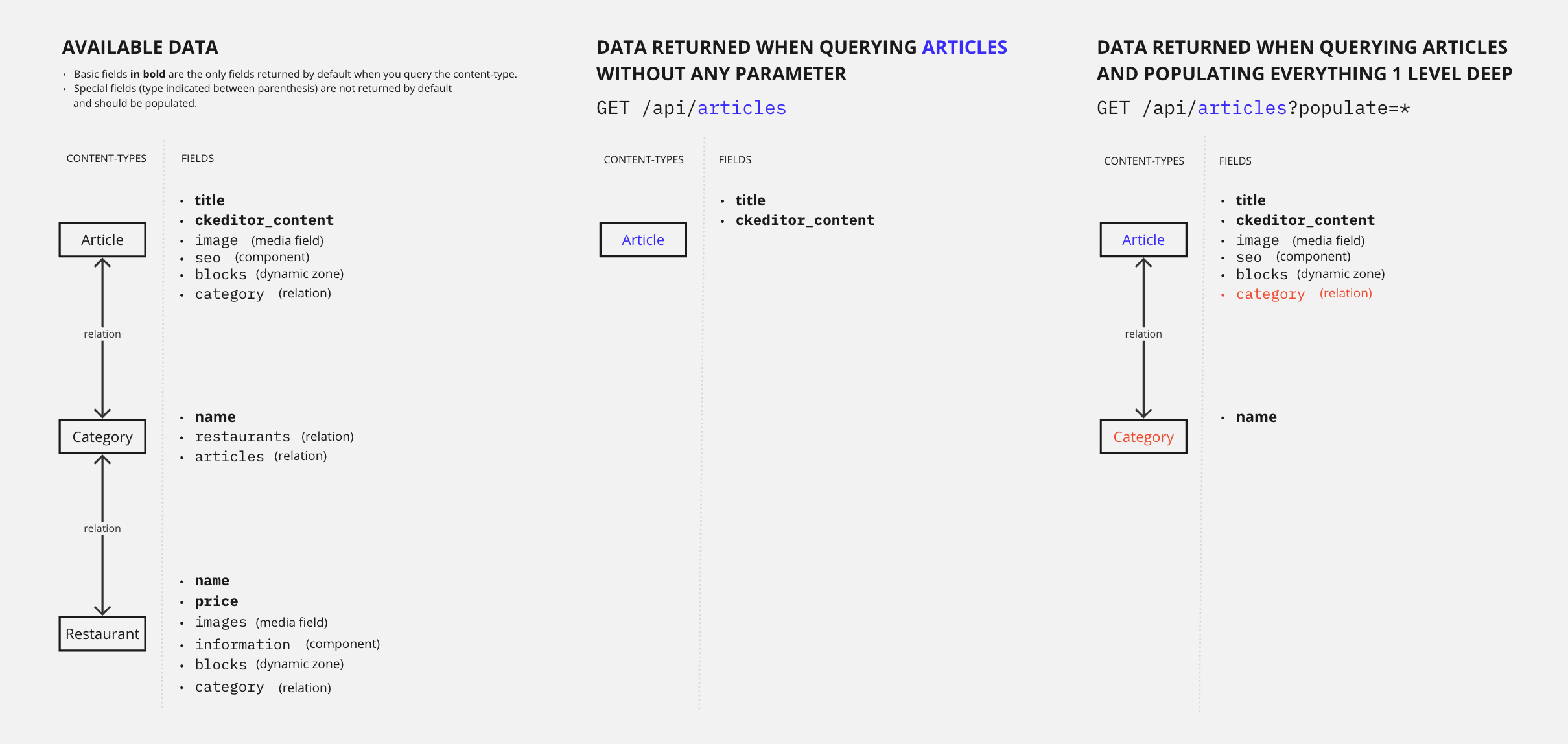
我们来对比并解释使用和不使用此查询参数时会发生什么:
Example: Without populate
如果不使用 populate 参数,向 /api/articles 发送的 GET 请求只返回默认属性,不会返回任何媒体字段、关联、组件或动态区域。
以下示例是来自 articles 内容类型的全部 4 条条目的完整响应。
请注意,响应仅包含 title、slug、createdAt、updatedAt、publishedAt 和 locale 字段,以及由 CKEditor 插件处理的文章内容字段(ckeditor_content,为简洁起见已截断):
仅返回默认属性,不包含任何媒体字段、关联、组件或动态区域。
cURL
curl 'http://localhost:1337/api/articles' \
  -H 'Authorization: Bearer <token>'
JavaScript
const response = await fetch(
  'http://localhost:1337/api/articles',
  {
    headers: {
      Authorization: 'Bearer <token>',
    },
  }
);
const data = await response.json();
响应
{
  "data": [
    {
      "id": 1,
      "documentId": "t3q2i3v1z2j7o8p6d0o4xxg",
      "title": "Here's why you have to try basque cuisine, according to a basque chef",
      "slug": "here-s-why-you-have-to-try-basque-cuisine-according-to-a-basque-chef",
      "createdAt": "2021-11-09T13:33:19.948Z",
      "updatedAt": "2023-06-02T10:57:19.584Z",
      "publishedAt": "2022-09-22T09:30:00.208Z",
      "locale": "en",
      "ckeditor_content": "// truncated content"
    },
    {
      "id": 2,
      "documentId": "k2r5l0i9g3u2j3b4p7f0sed",
      "title": "What are chinese hamburgers and why aren't you eating them?",
      "slug": "what-are-chinese-hamburgers-and-why-aren-t-you-eating-them",
      "createdAt": "2021-11-11T13:33:19.948Z",
      "updatedAt": "2023-06-01T14:32:50.984Z",
      "publishedAt": "2022-09-22T12:36:48.312Z",
      "locale": "en",
      "ckeditor_content": "// truncated content"
    },
    {
      "id": 3,
      "documentId": "k6m6l9q0n6v9z2m3i0z5jah",
      "title": "7 Places worth visiting for the food alone",
      "slug": "7-places-worth-visiting-for-the-food-alone",
      "createdAt": "2021-11-12T13:33:19.948Z",
      "updatedAt": "2023-06-02T11:30:00.075Z",
      "publishedAt": "2023-06-02T11:30:00.075Z",
      "locale": "en",
      "ckeditor_content": "// truncated content"
    },
    {
      "id": 4,
      "documentId": "d5m4b6z6g5d9e3v1k9n5gbn",
      "title": "If you don't finish your plate in these countries, you might offend someone",
      "slug": "if-you-don-t-finish-your-plate-in-these-countries-you-might-offend-someone",
      "createdAt": "2021-11-15T13:33:19.948Z",
      "updatedAt": "2023-06-02T10:59:35.148Z",
      "publishedAt": "2022-09-22T12:35:53.899Z",
      "locale": "en",
      "ckeditor_content": "// truncated content"
    }
  ],
  "meta": {
    "pagination": {
      "page": 1,
      "pageSize": 25,
      "pageCount": 1,
      "total": 4
    }
  }
}
Example: With populate=*
使用 populate=* 参数后,向 /api/articles 发送的 GET 请求还会返回所有媒体字段、一级关联、组件和动态区域。
以下示例是来自 articles 内容类型的全部 4 条条目中第 1 条的完整响应(id 为 2、3、4 的文章数据已截断以简洁起见)。
向下滚动可以看到,响应体积比不使用 populate 时要大得多。响应现在包含了额外的字段(见高亮行),例如:
image媒体字段(它存储了有关文章封面图的所有信息,包括其所有不同的格式),blocks动态区域和seo组件的 1 级字段,category关联及其字段,- 甚至还有一些关于翻译成其它语言的文章的信息,正如
localizations对象所示。
要联表加载深层嵌套的组件,请参阅 populate components(联表加载组件) 一节。
返回所有媒体字段、一级关联、组件和动态区域。
cURL
curl 'http://localhost:1337/api/articles?populate=*' \
  -H 'Authorization: Bearer <token>'
JavaScript
const response = await fetch(
  'http://localhost:1337/api/articles?populate=*',
  {
    headers: {
      Authorization: 'Bearer <token>',
    },
  }
);
const data = await response.json();
响应
{
  "data": [
    {
      "id": 1,
      "title": "Here's why you have to try basque cuisine, according to a basque chef",
      "slug": "here-s-why-you-have-to-try-basque-cuisine-according-to-a-basque-chef",
      "createdAt": "2021-11-09T13:33:19.948Z",
      "updatedAt": "2023-06-02T10:57:19.584Z",
      "publishedAt": "2022-09-22T09:30:00.208Z",
      "locale": "en",
      "ckeditor_content": "// truncated content",
      "image": {
        "data": {
            "id": 12,
            "documentId": "o5d4b0l4p8l4o4k5n1l3rxa",
            "name": "Basque dish",
            "alternativeText": "Basque dish",
            "caption": "Basque dish",
            "width": 758,
            "height": 506,
            "formats": {
              "thumbnail": {
                "name": "thumbnail_https://4d40-2a01-cb00-c8b-1800-7cbb-7da-ea9d-2011.ngrok.io/uploads/basque_cuisine_17fa4567e0.jpeg",
                "hash": "thumbnail_basque_cuisine_17fa4567e0_f033424240",
                "ext": ".jpeg",
                "mime": "image/jpeg",
                "width": 234,
                "height": 156,
                "size": 11.31,
                "path": null,
                "url": "/uploads/thumbnail_basque_cuisine_17fa4567e0_f033424240.jpeg"
              },
              "medium": {
                "name": "medium_https://4d40-2a01-cb00-c8b-1800-7cbb-7da-ea9d-2011.ngrok.io/uploads/basque_cuisine_17fa4567e0.jpeg",
                "hash": "medium_basque_cuisine_17fa4567e0_f033424240",
                "ext": ".jpeg",
                "mime": "image/jpeg",
                "width": 750,
                "height": 501,
                "size": 82.09,
                "path": null,
                "url": "/uploads/medium_basque_cuisine_17fa4567e0_f033424240.jpeg"
              },
              "small": {
                "name": "small_https://4d40-2a01-cb00-c8b-1800-7cbb-7da-ea9d-2011.ngrok.io/uploads/basque_cuisine_17fa4567e0.jpeg",
                "hash": "small_basque_cuisine_17fa4567e0_f033424240",
                "ext": ".jpeg",
                "mime": "image/jpeg",
                "width": 500,
                "height": 334,
                "size": 41.03,
                "path": null,
                "url": "/uploads/small_basque_cuisine_17fa4567e0_f033424240.jpeg"
              }
            },
            "hash": "basque_cuisine_17fa4567e0_f033424240",
            "ext": ".jpeg",
            "mime": "image/jpeg",
            "size": 58.209999999999994,
            "url": "/uploads/basque_cuisine_17fa4567e0_f033424240.jpeg",
            "previewUrl": null,
            "provider": "local",
            "provider_metadata": null,
            "createdAt": "2021-11-23T14:05:33.460Z",
            "updatedAt": "2021-11-23T14:05:46.084Z"
            }
          }
        },
        "blocks": [
          {
            "id": 2,
            "__component": "blocks.related-articles"
          },
          {
            "id": 2,
            "documentId": "w8r5k8o8v0t9l9e0d7y6vco",
            "__component": "blocks.cta-command-line",
            "theme": "primary",
            "title": "Want to give a try to a Strapi starter?",
            "text": "❤️",
            "commandLine": "git clone https://github.com/strapi/nextjs-corporate-starter.git"
          }
        ],
        "seo": {
          "id": 1,
          "documentId": "h7c8d0u3i3q5v1j3j3r4cxf",
          "metaTitle": "Articles - FoodAdvisor",
          "metaDescription": "Discover our articles about food, restaurants, bars and more! - FoodAdvisor",
          "keywords": "food",
          "metaRobots": null,
          "structuredData": null,
          "metaViewport": null,
          "canonicalURL": null
        },
        "category": {
          "data": {
            "id": 4,
            "documentId": "t1t3d9k6n1k5a6r8l7f8rox",
            "name": "European",
            "slug": "european",
            "createdAt": "2021-11-09T13:33:20.123Z",
            "updatedAt": "2021-11-09T13:33:20.123Z"
          }
        },
        "localizations": {
          "data": [
            {
              "id": 10,
              "documentId": "h7c8d0u3i3q5v1j3j3r4cxf",
              "title": "Voici pourquoi il faut essayer la cuisine basque, selon un chef basque",
              "slug": "voici-pourquoi-il-faut-essayer-la-cuisine-basque-selon-un-chef-basque",
              "createdAt": "2021-11-18T13:33:19.948Z",
              "updatedAt": "2023-06-02T10:57:19.606Z",
              "publishedAt": "2022-09-22T13:00:00.069Z",
              "locale": "fr-FR",
              "ckeditor_content": "// truncated content"
            }
          ]
        }
      }
    },
    {
      "id": 2,
      "// truncated content": true
    },
    {
      "id": 3,
      "// truncated content": true
    },
    {
      "id": 4,
      "// truncated content": true
    }
  ],
  "meta": {
    "pagination": {
      "page": 1,
      "pageSize": 25,
      "pageCount": 1,
      "total": 4
    }
  }
}
Populate specific relations and fields
你也可以联表加载指定的关联和字段,方法是显式定义要联表加载的内容。这要求你知晓要联表加载的字段和关联的名称。
以这种方式联表加载的关联和字段可以是 1 层深度,也可以是多层深度。下面的示意图比较了向 FoodAdvisor 示例应用发送查询时,联表加载 1 层深度 与 联表加载 2 层深度 所返回的数据:
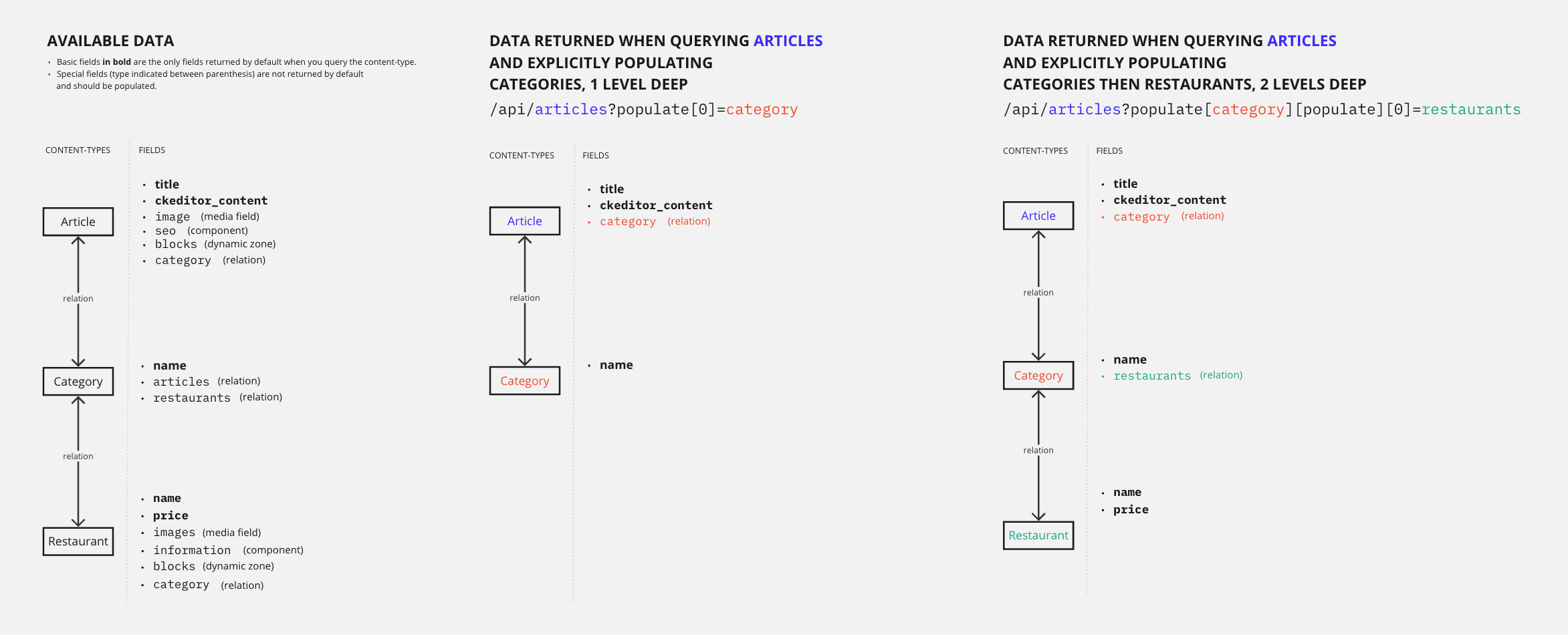
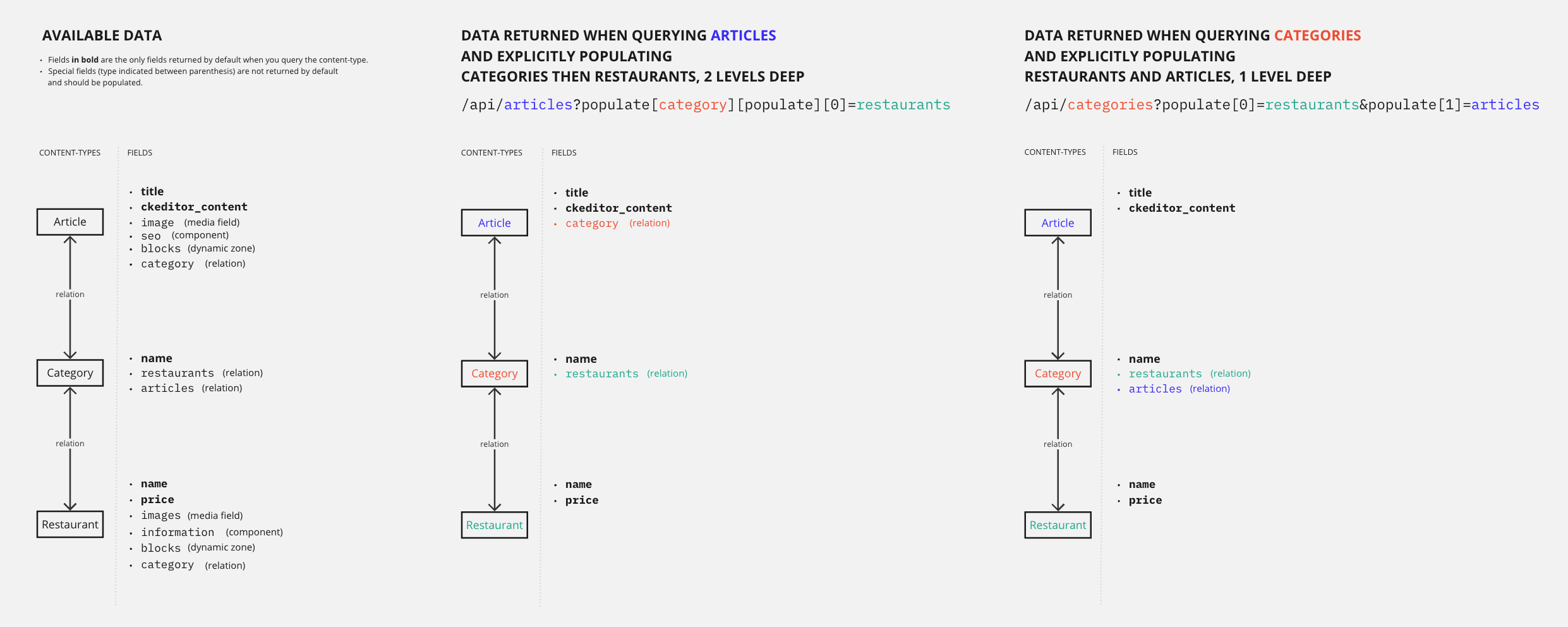
🤓 针对相似结果的不同联表加载策略 根据你内容结构的不同,你可能会通过不同的查询以不同的方式获取到相似的数据。例如,FoodAdvisor 示例应用包含 article、category 和 restaurant 这几个相互以不同方式关联的内容类型。这意味着,如果你想在单个 GET 请求中获取这 3 个内容类型的数据,你有 2 种选择:
- 查询 articles 并联表加载 categories,再加上 categories 与 restaurants 之间的嵌套关联(联表加载 2 层深度)
- 查询 categories 并同时联表加载 articles 和 restaurants,因为 categories 与另外 2 个内容类型都有 1 级关联(联表加载 1 层深度)
这 2 种不同的策略如下图所示:
populate 作为对象 vs. populate 作为数组:使用交互式查询构建器
高级查询参数的语法手动构建起来可能相当复杂。我们建议使用我们的 interactive query builder(交互式查询构建器) 工具来生成 URL。
使用该工具,你将以熟悉的(JavaScript)格式编写干净、可读的请求,这应该能帮助你理解不同查询之间以及不同联表加载方式之间的差异。例如,联表加载 2 层深度意味着将 populate 用作对象,而联表加载多个关联(深度 1 层)则意味着将 populate 用作数组:
将 populate 用作对象 (以联表加载 1 个关联的多层深度):
{
  populate: {
    category: {
      populate: ['restaurants'],
    },
  },
}
将 populate 用作数组 (以联表加载多个关联,深度 1 层)
{
  populate: [
    'articles',
    'restaurants'
  ],
}
Populate 1 level deep for specific relations
你可以通过将 populate 参数用作数组,来联表加载指定的关联(深度 1 层)。
由于 REST API 使用 LHS bracket notation(左侧方括号表示法)(即使用方括号 []),联表加载 1 层深度的参数语法如下所示:
| 要联表加载多少个关联 | 语法示例 |
|---|---|
| 仅 1 个关联 | populate[0]=a-relation-name |
| 多个关联 | populate[0]=relation-name&populate[1]=another-relation-name&populate[2]=yet-another-relation-name |
我们来对比并解释,向 FoodAdvisor 示例应用发送查询时,联表加载 1 层深度的关联与不联表加载关联会发生什么:
Example: Without populate
如果不使用 populate 参数,向 /api/articles 发送的 GET 请求只返回默认属性。
以下示例是来自 articles 内容类型的全部 4 条条目的完整响应。
请注意,响应不包含任何媒体字段、关联、组件或动态区域:
返回所有文章的默认属性。
cURL
curl 'http://localhost:1337/api/articles' \
  -H 'Authorization: Bearer <token>'
JavaScript
const response = await fetch(
  'http://localhost:1337/api/articles',
  {
    headers: {
      Authorization: 'Bearer <token>',
    },
  }
);
const data = await response.json();
响应
{
  "data": [
    {
      "id": 1,
      "documentId": "x2m0d7d9o4m2z3u2r2l9yes",
      "title": "Here's why you have to try basque cuisine, according to a basque chef",
      "slug": "here-s-why-you-have-to-try-basque-cuisine-according-to-a-basque-chef",
      "createdAt": "2021-11-09T13:33:19.948Z",
      "updatedAt": "2023-06-02T10:57:19.584Z",
      "publishedAt": "2022-09-22T09:30:00.208Z",
      "locale": "en",
      "ckeditor_content": "…"
    },
    {
      "id": 2,
      "documentId": "k6m6l9q0n6v9z2m3i0z5jah",
      "title": "What are chinese hamburgers and why aren't you eating them?",
      "slug": "what-are-chinese-hamburgers-and-why-aren-t-you-eating-them",
      "createdAt": "2021-11-11T13:33:19.948Z",
      "updatedAt": "2023-06-01T14:32:50.984Z",
      "publishedAt": "2022-09-22T12:36:48.312Z",
      "locale": "en",
      "ckeditor_content": "…"
    },
    {
      "id": 3,
      "documentId": "o5d4b0l4p8l4o4k5n1l3rxa",
      "title": "7 Places worth visiting for the food alone",
      "slug": "7-places-worth-visiting-for-the-food-alone",
      "createdAt": "2021-11-12T13:33:19.948Z",
      "updatedAt": "2023-06-02T11:30:00.075Z",
      "publishedAt": "2023-06-02T11:30:00.075Z",
      "locale": "en",
      "ckeditor_content": "…"
    },
    {
      "id": 4,
      "documentId": "t3q2i3v1z2j7o8p6d0o4xxg",
      "title": "If you don't finish your plate in these countries, you might offend someone",
      "slug": "if-you-don-t-finish-your-plate-in-these-countries-you-might-offend-someone",
      "createdAt": "2021-11-15T13:33:19.948Z",
      "updatedAt": "2023-06-02T10:59:35.148Z",
      "publishedAt": "2022-09-22T12:35:53.899Z",
      "locale": "en",
      "ckeditor_content": "…"
    }
  ],
  "meta": {
    "pagination": {
      "page": 1,
      "pageSize": 25,
      "pageCount": 1,
      "total": 4
    }
  }
}
Example: With populate[0]=category
在请求中添加 populate[0]=category 后,我们显式要求包含 category 的一些信息,它是一个将 articles 和 categories 内容类型关联起来的关联字段。
以下示例是来自 articles 内容类型的全部 4 条条目的完整响应。
请注意,响应现在为每篇文章包含了带有 category 字段的额外数据(见高亮行):
返回已联表加载相关 category 数据的文章。
cURL
curl 'http://localhost:1337/api/articles?populate[0]=category' \
  -H 'Authorization: Bearer <token>'
JavaScript
const response = await fetch(
  'http://localhost:1337/api/articles?populate[0]=category',
  {
    headers: {
      Authorization: 'Bearer <token>',
    },
  }
);
const data = await response.json();
响应
{
  "data": [
    {
      "id": 1,
      "documentId": "w8r5k8o8v0t9l9e0d7y6vco",
      "title": "Here's why you have to try basque cuisine, according to a basque chef",
      "slug": "here-s-why-you-have-to-try-basque-cuisine-according-to-a-basque-chef",
      "createdAt": "2021-11-09T13:33:19.948Z",
      "updatedAt": "2023-06-02T10:57:19.584Z",
      "publishedAt": "2022-09-22T09:30:00.208Z",
      "locale": "en",
      "ckeditor_content": "…",
      "category": {
        "data": {
          "id": 4,
          "documentId": "u6x8u7o7j5q1l5y3t8j9yxi",
          "name": "European",
          "slug": "european",
          "createdAt": "2021-11-09T13:33:20.123Z",
          "updatedAt": "2021-11-09T13:33:20.123Z"
        }
      }
    },
    {
      "id": 2,
      "documentId": "k6m6l9q0n6v9z2m3i0z5jah",
      "title": "What are chinese hamburgers and why aren't you eating them?",
      "slug": "what-are-chinese-hamburgers-and-why-aren-t-you-eating-them",
      "createdAt": "2021-11-11T13:33:19.948Z",
      "updatedAt": "2023-06-01T14:32:50.984Z",
      "publishedAt": "2022-09-22T12:36:48.312Z",
      "locale": "en",
      "ckeditor_content": "…",
      "category": {
        "data": {
          "id": 13,
          "documentId": "x2m0d7d9o4m2z3u2r2l9yes",
          "name": "Chinese",
          "slug": "chinese",
          "createdAt": "2021-11-09T13:33:20.123Z",
          "updatedAt": "2021-11-09T13:33:20.123Z"
        }
      }
    },
    {
      "id": 3,
      "title": "7 Places worth visiting for the food alone",
      "slug": "7-places-worth-visiting-for-the-food-alone",
      "createdAt": "2021-11-12T13:33:19.948Z",
      "updatedAt": "2023-06-02T11:30:00.075Z",
      "publishedAt": "2023-06-02T11:30:00.075Z",
      "locale": "en",
      "ckeditor_content": "…",
      "category": {
        "data": {
          "id": 3,
          "documentId": "h7c8d0u3i3q5v1j3j3r4cxf",
          "name": "International",
          "slug": "international",
          "createdAt": "2021-11-09T13:33:20.123Z",
          "updatedAt": "2021-11-09T13:33:20.123Z"
        }
      }
    },
    {
      "id": 4,
      "documentId": "t1t3d9k6n1k5a6r8l7f8rox",
      "title": "If you don't finish your plate in these countries, you might offend someone",
      "slug": "if-you-don-t-finish-your-plate-in-these-countries-you-might-offend-someone",
      "createdAt": "2021-11-15T13:33:19.948Z",
      "updatedAt": "2023-06-02T10:59:35.148Z",
      "publishedAt": "2022-09-22T12:35:53.899Z",
      "locale": "en",
      "ckeditor_content": "…",
      "category": {
        "data": {
          "id": 3,
          "documentId": "u6x8u7o7j5q1l5y3t8j9yxi",
          "name": "International",
          "slug": "international",
          "createdAt": "2021-11-09T13:33:20.123Z",
          "updatedAt": "2021-11-09T13:33:20.123Z"
        }
      }
    }
  ],
  "meta": {
    "pagination": {
      "page": 1,
      "pageSize": 25,
      "pageCount": 1,
      "total": 4
    }
  }
}
Populate several levels deep for specific relations
你也可以联表加载指定关联的多层深度。例如,当你联表加载一个本身又联表加载了另一个关联的关联时,你就是在联表加载 2 层深度。本指南涵盖的示例正是联表加载 2 层深度。
可以联表加载的层级数没有限制。但是,联表加载的层级越深,请求执行所花费的时间就越长。
由于 REST API 使用 LHS bracket notation(左侧方括号表示法)(即使用方括号 []),例如,如果你想联表加载嵌套在另一个关联内部的关联,参数语法如下所示:
populate[first-level-relation-to-populate][populate][0]=second-level-relation-to-populate
高级查询参数的语法手动构建起来可能相当复杂。我们建议使用我们的 interactive query builder(交互式查询构建器) 工具来生成 URL。例如,下面示例中使用的 /api/articles?populate[category][populate][0]=restaurants URL,就是通过使用我们的工具转换以下对象生成的:
{
  populate: {
    category: {
      populate: ['restaurants'],
    },
  },
}
FoodAdvisor 示例应用包含内容类型之间各种层级的关联。例如:
- 一个
article内容类型包含一个与category内容类型的关联, - 但一个
category也可以被分配给任意restaurant内容类型。
通过对 /api/articles 发送一次 GET 请求并配合使用适当的 populate 参数,你可以同时返回关于 articles、restaurants 和 categories 的信息。
我们来对比并解释,向 FoodAdvisor 发送查询时,使用 populate[0]=category(1 层深度)与 populate[category][populate][0]=restaurants(2 层深度)所返回的响应:
Example: With 1-level deep population
当我们仅联表加载 1 层深度,即请求与文章相关联的 categories 时,我们可以得到如下示例响应(高亮行展示了 category 关联字段):
联表加载 category 关联,深度 1 层。
cURL
curl 'http://localhost:1337/api/articles?populate[0]=category' \
  -H 'Authorization: Bearer <token>'
JavaScript
const response = await fetch(
  'http://localhost:1337/api/articles?populate[0]=category',
  {
    headers: {
      Authorization: 'Bearer <token>',
    },
  }
);
const data = await response.json();
响应
{
  "data": [
    {
      "id": 1,
      "documentId": "9ih6hy1bnma3q3066kdwt3",
      "title": "Here's why you have to try basque cuisine, according to a basque chef",
      "slug": "here-s-why-you-have-to-try-basque-cuisine-according-to-a-basque-chef",
      "createdAt": "2021-11-09T13:33:19.948Z",
      "updatedAt": "2023-06-02T10:57:19.584Z",
      "publishedAt": "2022-09-22T09:30:00.208Z",
      "locale": "en",
      "ckeditor_content": "…",
      "category": {
        "data": {
          "id": 4,
          "name": "European",
          "slug": "european",
          "createdAt": "2021-11-09T13:33:20.123Z",
          "updatedAt": "2021-11-09T13:33:20.123Z"
        }
      }
    },
    {
      "id": 2,
      "documentId": "sen6qfgxcac13pwchf8xbu",
      "title": "What are chinese hamburgers and why aren't you eating them?",
      "slug": "what-are-chinese-hamburgers-and-why-aren-t-you-eating-them",
      "createdAt": "2021-11-11T13:33:19.948Z",
      "updatedAt": "2023-06-01T14:32:50.984Z",
      "publishedAt": "2022-09-22T12:36:48.312Z",
      "locale": "en",
      "ckeditor_content": "…",
      "category": {
        "data": {
          "id": 13,
          "documentId": "r3rhzcxd7gjx07vkq3pia5",
          "name": "Chinese",
          "slug": "chinese",
          "createdAt": "2021-11-09T13:33:20.123Z",
          "updatedAt": "2021-11-09T13:33:20.123Z"
        }
      }
    },
    {
      "id": 3,
      "documentId": "s9uu7rkukhfcsmj2e60b67",
      "title": "7 Places worth visiting for the food alone",
      "slug": "7-places-worth-visiting-for-the-food-alone",
      "createdAt": "2021-11-12T13:33:19.948Z",
      "updatedAt": "2023-06-02T11:30:00.075Z",
      "publishedAt": "2023-06-02T11:30:00.075Z",
      "locale": "en",
      "ckeditor_content": "…",
      "category": {
        "data": {
          "id": 3,
          "documentId": "4sevz15w6bdol6y4t8kblk",
          "name": "International",
          "slug": "international",
          "createdAt": "2021-11-09T13:33:20.123Z",
          "updatedAt": "2021-11-09T13:33:20.123Z"
        }
      }
    },
    {
      "id": 4,
      "documentId": "iy5ifm3xj8q0t8vlq6l23h",
      "title": "If you don't finish your plate in these countries, you might offend someone",
      "slug": "if-you-don-t-finish-your-plate-in-these-countries-you-might-offend-someone",
      "createdAt": "2021-11-15T13:33:19.948Z",
      "updatedAt": "2023-06-02T10:59:35.148Z",
      "publishedAt": "2022-09-22T12:35:53.899Z",
      "locale": "en",
      "ckeditor_content": "…",
      "category": {
        "data": {
          "id": 3,
          "documentId": "0eor603u8qej933maphdv3",
          "name": "International",
          "slug": "international",
          "createdAt": "2021-11-09T13:33:20.123Z",
          "updatedAt": "2021-11-09T13:33:20.123Z"
        }
      }
    }
  ],
  "meta": {
    "pagination": {
      "page": 1,
      "pageSize": 25,
      "pageCount": 1,
      "total": 4
    }
  }
}
Example: With 2-level deep population
当我们联表加载 2 层深度,请求与文章相关联的 categories,以及这些 categories 相关联的 restaurants 时,我们可以得到如下示例响应。
请注意,我们现在在 category 关联内部得到了包含在响应中的 restaurants 关联字段(见高亮行):
联表加载 category 关联以及嵌套的 restaurants 关联,深度 2 层。
cURL
curl 'http://localhost:1337/api/articles?populate[category][populate][0]=restaurants' \
  -H 'Authorization: Bearer <token>'
JavaScript
const response = await fetch(
  'http://localhost:1337/api/articles?populate[category][populate][0]=restaurants',
  {
    headers: {
      Authorization: 'Bearer <token>',
    },
  }
);
const data = await response.json();
响应
{
  "data": [
    {
      "id": 1,
      "documentId": "iy5ifm3xj8q0t8vlq6l23h",
      "title": "Here's why you have to try basque cuisine, according to a basque chef",
      "slug": "here-s-why-you-have-to-try-basque-cuisine-according-to-a-basque-chef",
      "createdAt": "2021-11-09T13:33:19.948Z",
      "updatedAt": "2023-06-02T10:57:19.584Z",
      "publishedAt": "2022-09-22T09:30:00.208Z",
      "locale": "en",
      "ckeditor_content": "…",
      "category": {
        "data": {
          "id": 4,
          "name": "European",
          "slug": "european",
          "createdAt": "2021-11-09T13:33:20.123Z",
          "updatedAt": "2021-11-09T13:33:20.123Z",
          "restaurants": {
            "data": [
              {
                "id": 1,
                "documentId": "ozlqrdxpnjb7wtvf6lp74v",
                "name": "Mint Lounge",
                "slug": "mint-lounge",
                "price": "p3",
                "createdAt": "2021-11-09T14:07:47.125Z",
                "updatedAt": "2021-11-23T16:41:30.504Z",
                "publishedAt": "2021-11-23T16:41:30.501Z",
                "locale": "en"
              },
              {
                "id": 9,
                "// truncated content": true
              },
              {
                "id": 10,
                "// truncated content": true
              },
              {
                "id": 12,
                "// truncated content": true
              },
              {
                "id": 21,
                "// truncated content": true
              },
              {
                "id": 26,
                "// truncated content": true
              }
            ]
          }
        }
      }
    },
    {
      "id": 2,
      "// truncated content": true
    },
    {
      "id": 3,
      "// truncated content": true
    },
    {
      "id": 4,
      "// truncated content": true
    }
  ],
  "meta": {
    "pagination": {
      "page": 1,
      "pageSize": 25,
      "pageCount": 1,
      "total": 4
    }
  }
}
Populate components
组件和动态区域默认不包含在响应中,你需要显式联表加载每个动态区域、组件,以及它们嵌套的组件。
由于 REST API 使用 LHS bracket notation(左侧方括号表示法)(即使用方括号 []),你需要在一个 populate 数组中传入所有元素。也可以传入嵌套字段,参数语法可能如下所示:
populate[0]=a-first-field&populate[1]=a-second-field&populate[2]=a-third-field&populate[3]=a-third-field.a-nested-field&populate[4]=a-third-field.a-nested-component.a-nested-field-within-the-component
高级查询参数的语法手动构建起来可能相当复杂。我们建议使用我们的 interactive query builder(交互式查询构建器) 工具来生成 URL。例如,下面示例中使用的 /api/articles?populate[0]=seo&populate[1]=seo.metaSocial&populate[2]=seo.metaSocial.image URL,就是通过使用我们的工具转换以下对象生成的:
{
  populate: [
    'seoData',
    'seoData.sharedImage',
    'seoData.sharedImage.media',
  ],
},
FoodAdvisor 示例应用包含各种组件,甚至包含嵌套在其它组件内部的组件。例如:
- 一个
article内容类型包含一个seo组件 > **提示:**此处原本是一个交互式组件(ScreenshotNumberReference),在静态 Markdown 中无法渲染。可参考原始在线文档查看对应内容。, seo组件包含一个可重复的嵌套metaSocial组件 > **提示:**此处原本是一个交互式组件(ScreenshotNumberReference),在静态 Markdown 中无法渲染。可参考原始在线文档查看对应内容。,- 而
metaSocial组件本身又有若干字段,包括一个image媒体字段 > **提示:**此处原本是一个交互式组件(ScreenshotNumberReference),在静态 Markdown 中无法渲染。可参考原始在线文档查看对应内容。。
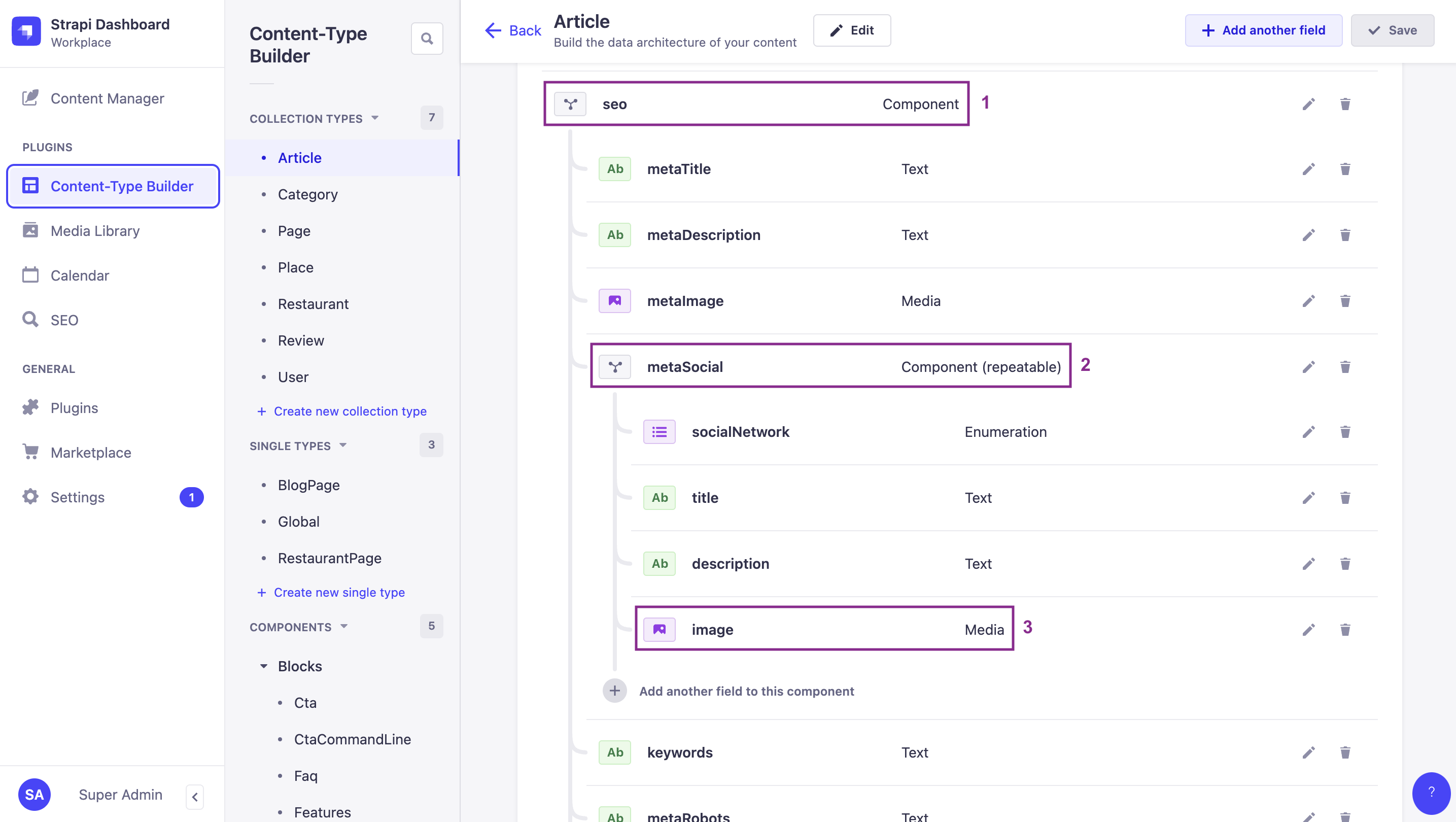
默认情况下,在向 /api/articles 发送的 GET 请求的响应中,不会包含这些字段或组件中的任何一个。但通过适当的 populate 参数,你可以在一次请求中返回它们全部。
我们来对比并解释,使用 populate[0]=seo(1 级组件)与 populate[0]=seo&populate[1]=seo.metaSocial(嵌套在 1 级组件内部的 2 级组件)所返回的响应:
Example: Only 1st level component
当我们只联表加载 seo 组件时,我们仅深入 1 层,可以得到如下示例响应。高亮行展示了 seo 组件。
请注意,没有提及嵌套在 seo 组件内部的 metaSocial 组件:
仅联表加载 seo 组件,深度 1 层。
cURL
curl 'http://localhost:1337/api/articles?populate[0]=seo' \
  -H 'Authorization: Bearer <token>'
JavaScript
const response = await fetch(
  'http://localhost:1337/api/articles?populate[0]=seo',
  {
    headers: {
      Authorization: 'Bearer <token>',
    },
  }
);
const data = await response.json();
响应
{
  "data": [
    {
      "id": 1,
      "documentId": "md60m5cy3dula5g87x1uar",
      "title": "Here's why you have to try basque cuisine, according to a basque chef",
      "slug": "here-s-why-you-have-to-try-basque-cuisine-according-to-a-basque-chef",
      "createdAt": "2021-11-09T13:33:19.948Z",
      "updatedAt": "2023-06-02T10:57:19.584Z",
      "publishedAt": "2022-09-22T09:30:00.208Z",
      "locale": "en",
      "ckeditor_content": "…",
      "seo": {
        "id": 1,
        "documentId": "kqcwhq6hes25kt9ebj8x7j",
        "metaTitle": "Articles - FoodAdvisor",
        "metaDescription": "Discover our articles about food, restaurants, bars and more! - FoodAdvisor",
        "keywords": "food",
        "metaRobots": null,
        "structuredData": null,
        "metaViewport": null,
        "canonicalURL": null
      }
    },
    {
      "id": 2,
      "// truncated content": true
    },
    {
      "id": 3,
      "// truncated content": true
    },
    {
      "id": 4,
      "// truncated content": true
    }
  ],
  "meta": {
    "pagination": {
      "page": 1,
      "pageSize": 25,
      "pageCount": 1,
      "total": 4
    }
  }
}
Example: 1st level and 2nd level component
当我们联表加载 2 层深度,同时请求 seo 组件以及嵌套在 seo 内部的 metaSocial 组件时,我们可以得到如下示例响应。
请注意,我们现在在响应中包含了与 metaSocial 组件相关的数据(见高亮行):
联表加载 seo 组件以及嵌套的 metaSocial 组件。
cURL
curl 'http://localhost:1337/api/articles?populate[0]=seo&populate[1]=seo.metaSocial' \
  -H 'Authorization: Bearer <token>'
JavaScript
const response = await fetch(
  'http://localhost:1337/api/articles?populate[0]=seo&populate[1]=seo.metaSocial',
  {
    headers: {
      Authorization: 'Bearer <token>',
    },
  }
);
const data = await response.json();
响应
{
  "data": [
    {
      "id": 1,
      "documentId": "c2imt19iywk27hl2ftph7s",
      "title": "Here's why you have to try basque cuisine, according to a basque chef",
      "slug": "here-s-why-you-have-to-try-basque-cuisine-according-to-a-basque-chef",
      "createdAt": "2021-11-09T13:33:19.948Z",
      "updatedAt": "2023-06-02T10:57:19.584Z",
      "publishedAt": "2022-09-22T09:30:00.208Z",
      "locale": "en",
      "ckeditor_content": "…",
      "seo": {
        "id": 1,
        "documentId": "e8cnux5ejxyqrejd5addfv",
        "metaTitle": "Articles - FoodAdvisor",
        "metaDescription": "Discover our articles about food, restaurants, bars and more! - FoodAdvisor",
        "keywords": "food",
        "metaRobots": null,
        "structuredData": null,
        "metaViewport": null,
        "canonicalURL": null,
        "metaSocial": [
          {
            "id": 1,
            "documentId": "ks7xsp9fewoi0qljcz9qa0",
            "socialNetwork": "Facebook",
            "title": "Browse our best articles about food and restaurants ",
            "description": "Discover our articles about food, restaurants, bars and more!"
          }
        ]
      }
    },
    {
      "id": 2,
      "// truncated content": true
    },
    {
      "id": 3,
      "// truncated content": true
    },
    {
      "id": 4,
      "// truncated content": true
    }
  ],
  "meta": {
    "pagination": {
      "page": 1,
      "pageSize": 25,
      "pageCount": 1,
      "total": 4
    }
  }
}
Populate dynamic zones
Dynamic zones are highly dynamic content structures by essence. When querying dynamic zones, standard populate parameters (such as populate[0]=dynamic-zone-name or populate=*) will only fetch the default scalar fields (e.g., strings, numbers, booleans) of the components within the dynamic zone. By default, they will not populate nested relations, media fields, or nested components inside those components.
To retrieve component-specific nested relations, media fields, or components within a dynamic zone, you must define per-component populate queries using the on property (fragment population syntax). This is because different components in a dynamic zone can have completely different structures, and require their own unique nested queries.
For instance, in the FoodAdvisor example application:
- A
blocksdynamic zone exists on thearticlecontent-type > **提示:**此处原本是一个交互式组件(ScreenshotNumberReference),在静态 Markdown 中无法渲染。可参考原始在线文档查看对应内容。. - The dynamic zone includes 3 different components:
relatedArticles> **提示:**此处原本是一个交互式组件(ScreenshotNumberReference),在静态 Markdown 中无法渲染。可参考原始在线文档查看对应内容。,faq> **提示:**此处原本是一个交互式组件(ScreenshotNumberReference),在静态 Markdown 中无法渲染。可参考原始在线文档查看对应内容。, andCtaCommandLine> **提示:**此处原本是一个交互式组件(ScreenshotNumberReference),在静态 Markdown 中无法渲染。可参考原始在线文档查看对应内容。. All components have a different content structure containing various fields. - The
relatedArticlescomponent has anarticlesrelation > **提示:**此处原本是一个交互式组件(ScreenshotNumberReference),在静态 Markdown 中无法渲染。可参考原始在线文档查看对应内容。 with the article content-type.
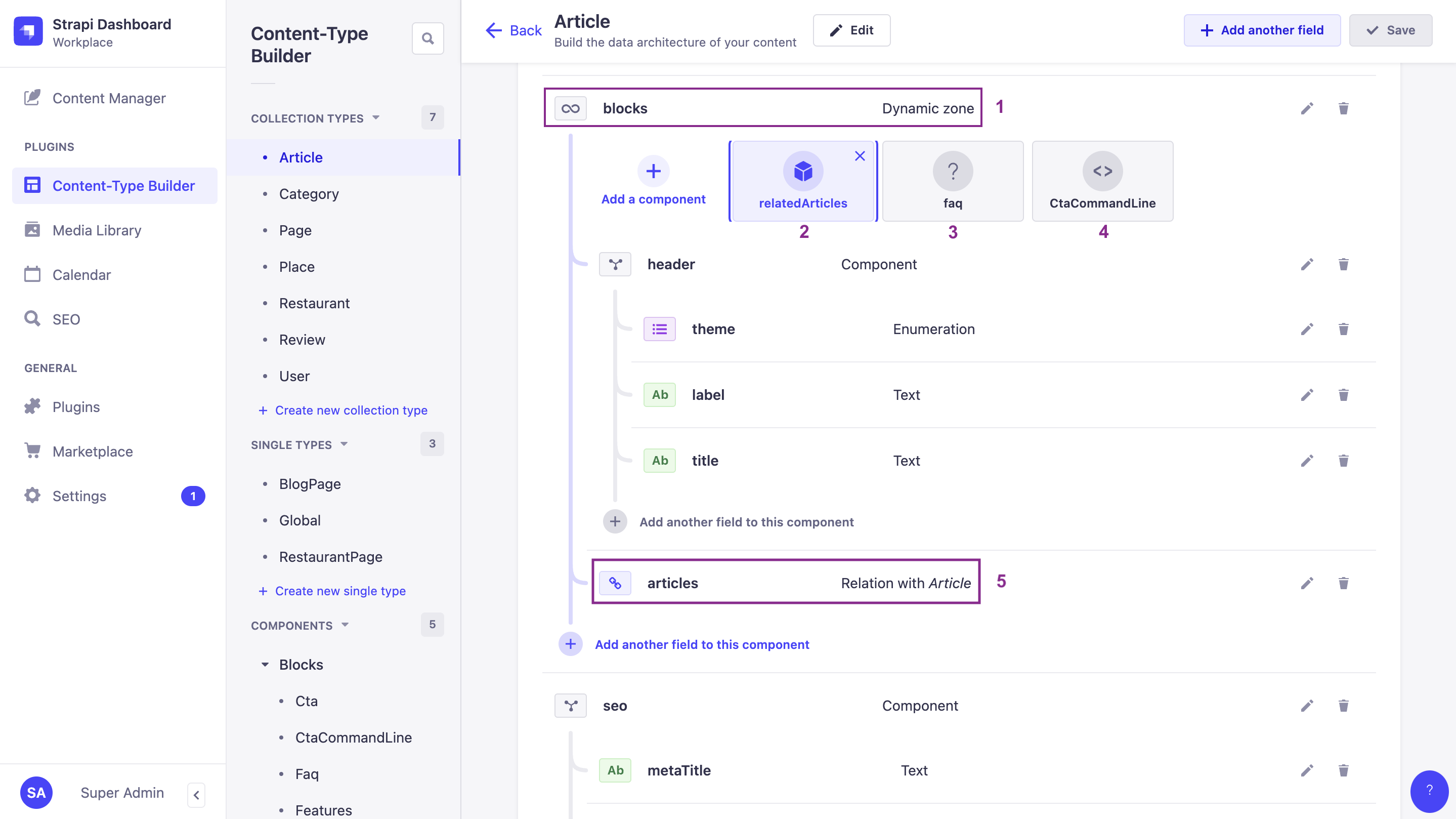
By default, none of the deeply nested fields or relations are included in the response of a GET request to /api/articles. With the appropriate populate parameters and by applying a detailed population strategy using the fragment on property, you can return precisely the data you need.
高级查询参数的语法手动构建起来可能相当复杂。我们建议使用我们的 interactive query builder(交互式查询构建器) 工具来生成 URL。例如,下面示例中使用的 /api/articles?populate[blocks][on][blocks.related-articles][populate][articles][populate][0]=image&populate[blocks][on][blocks.cta-command-line][populate]=* URL,就是通过使用我们的工具转换以下对象生成的:
{
  populate: {
    blocks: { // asking to populate the blocks dynamic zone
      on: { // using a detailed population strategy to explicitly define what you want
        'blocks.related-articles': {
          populate: {
           'articles': {
             populate: ['image']
           }
         }
        },
        'blocks.cta-command-line': {
          populate: '*'
        }
      },
    },
  },
}
Let's compare and explain the responses returned with some examples of a shared population strategy and a detailed population strategy:
Example
When we populate the blocks dynamic zone, we explicitly define which data to populate.
In the following example response, highlighted lines show that:
-
We deeply populate the
articlesrelation of therelatedArticlescomponent, and even theimagemedia field of the related article using fragment (on) population. -
But because we have only asked to populate everything for the
CtaCommandLinecomponent and have not defined anything for thefaqcomponent, no data from thefaqcomponent is returned.
使用逐组件的详细联表加载策略来联表加载 blocks 动态区域。
cURL
curl 'http://localhost:1337/api/articles?populate[blocks][on][blocks.related-articles][populate][articles][populate][0]=image&populate[blocks][on][blocks.cta-command-line][populate]=*' \
  -H 'Authorization: Bearer <token>'
JavaScript
const response = await fetch(
  'http://localhost:1337/api/articles?populate[blocks][on][blocks.related-articles][populate][articles][populate][0]=image&populate[blocks][on][blocks.cta-command-line][populate]=*',
  {
    headers: {
      Authorization: 'Bearer <token>',
    },
  }
);
const data = await response.json();
响应
{
  "data": [
    {
      "id": 1,
      "documentId": "it9bbhcgc6mcfsqas7h1dp",
      "title": "Here's why you have to try basque cuisine, according to a basque chef",
      "slug": "here-s-why-you-have-to-try-basque-cuisine-according-to-a-basque-chef",
      "createdAt": "2021-11-09T13:33:19.948Z",
      "updatedAt": "2023-06-02T10:57:19.584Z",
      "publishedAt": "2022-09-22T09:30:00.208Z",
      "locale": "en",
      "ckeditor_content": "// truncated content",
      "blocks": [
        {
          "id": 2,
          "documentId": "e8cnux5ejxyqrejd5addfv",
          "__component": "blocks.related-articles",
          "articles": {
            "data": [
              {
                "id": 2,
                "documentId": "wkgojrcg5bkz8teqx1foz7",
                "title": "What are chinese hamburgers and why aren't you eating them?",
                "slug": "what-are-chinese-hamburgers-and-why-aren-t-you-eating-them",
                "createdAt": "2021-11-11T13:33:19.948Z",
                "updatedAt": "2023-06-01T14:32:50.984Z",
                "publishedAt": "2022-09-22T12:36:48.312Z",
                "locale": "en",
                "ckeditor_content": "// truncated content",
                "image": {
                  "data": {
                      "// …": true
                    }
                  }
                }
              },
              {
                "id": 3,
                "// …": true
              },
              {
                "id": 4,
                "// …": true
              }
            ]
          }
        },
        {
          "id": 2,
          "__component": "blocks.cta-command-line",
          "theme": "primary",
          "title": "Want to give a try to a Strapi starter?",
          "text": "❤️",
          "commandLine": "git clone https://github.com/strapi/nextjs-corporate-starter.git"
        }
      ]
    },
    {
      "id": 2,
      "// …": true
    },
    {
      "id": 3,
      "documentId": "z5jnfvyuj07fogzh1kcbd3",
      "title": "7 Places worth visiting for the food alone",
      "slug": "7-places-worth-visiting-for-the-food-alone",
      "createdAt": "2021-11-12T13:33:19.948Z",
      "updatedAt": "2023-06-02T11:30:00.075Z",
      "publishedAt": "2023-06-02T11:30:00.075Z",
      "locale": "en",
      "ckeditor_content": "// truncated content",
      "blocks": [
        {
          "id": 1,
          "documentId": "ks7xsp9fewoi0qljcz9qa0",
          "__component": "blocks.related-articles",
          "articles": {
            "// …": true
          }
        },
        {
          "id": 1,
          "documentId": "c2imt19iywk27hl2ftph7s",
          "__component": "blocks.cta-command-line",
          "theme": "secondary",
          "title": "Want to give it a try with a brand new project?",
          "text": "Up & running in seconds 🚀",
          "commandLine": "npx create-strapi-app my-project --quickstart"
        }
      ]
    },
    {
      "id": 4,
      "// …": true
    }
  ],
  "meta": {
    "pagination": {
      "page": 1,
      "pageSize": 25,
      "pageCount": 1,
      "total": 4
    }
  }
}
使用 populate=* 或深度联表加载插件可能会产生不可预测的、代价高昂的数据库查询。在生产环境中,请始终显式联表加载,并将深度限制在 2-3 层。考虑使用路由级中间件(route-level middlewares)来集中管理联表加载逻辑。请参阅 Strapi 博客上的 Building High-Performance Strapi Applications(构建高性能 Strapi 应用)。