
GraphQL
页面摘要: GraphQL 插件添加了一个 GraphQL 端点以及一个基于 Apollo 的沙盒,用于编写查询和修改。config/plugins 中的选项让你可以调整深度、条目限制以及其他 Apollo Server 设置,本指南将对此进行说明。
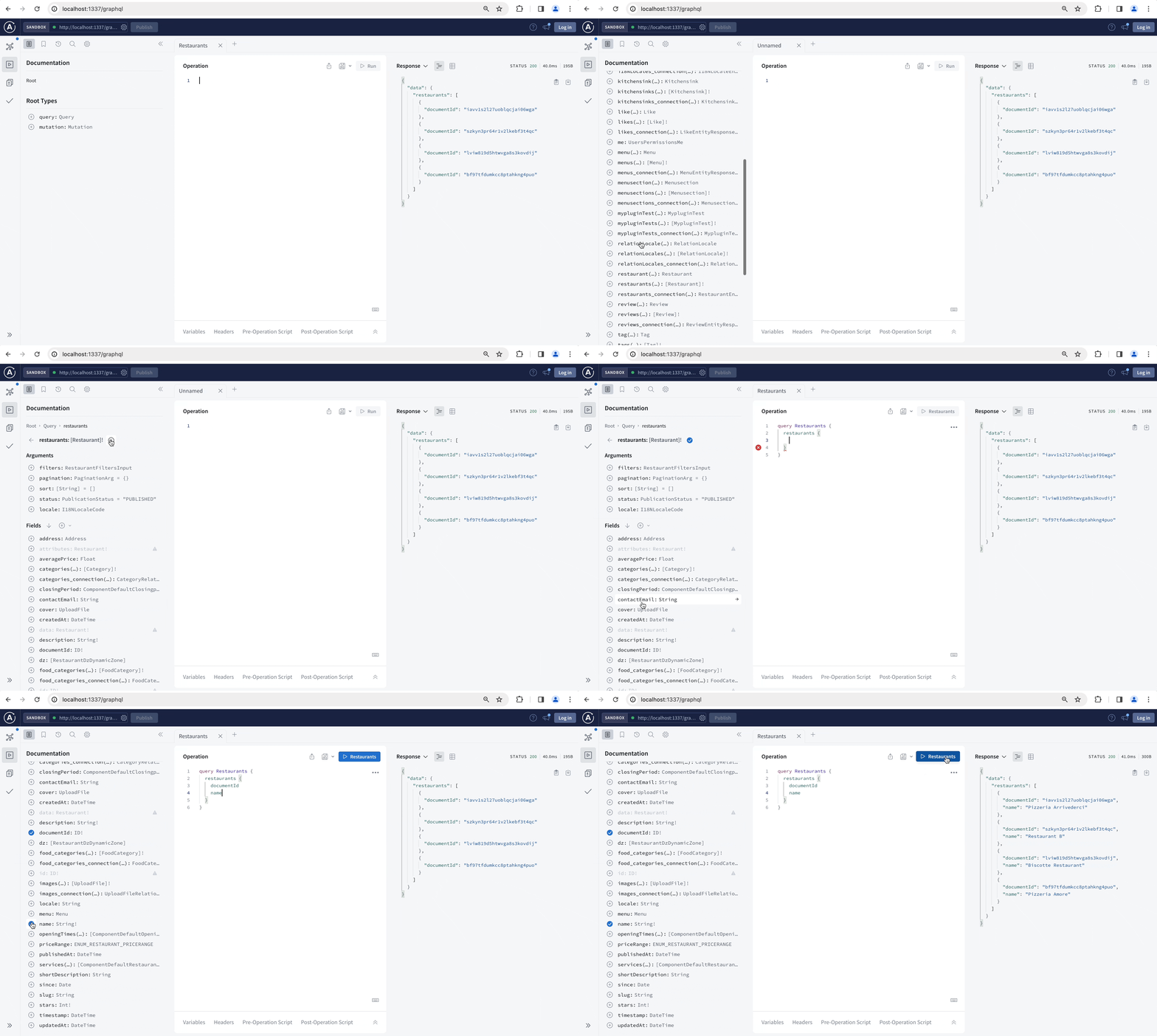
默认情况下,Strapi 会为你的每个内容类型创建 REST 端点。GraphQL 插件会添加一个 GraphQL 端点来获取和修改你的内容。安装 GraphQL 插件后,你可以使用基于 Apollo Server 的 GraphQL Sandbox 交互式地构建你的查询和修改,并阅读针对你的内容类型定制的文档。
- 位置:可通过管理面板使用。 可通过管理面板和服务器代码进行配置,两者拥有一组不同的选项。
- 包名:
@strapi/plugin-graphql - 其他资源:Strapi Marketplace 页面
安装
要安装 GraphQL 插件,请在终端中运行以下命令:
Yarn
yarn add @strapi/plugin-graphql
NPM
npm install @strapi/plugin-graphql
安装完成后,GraphQL 沙盒可在 /graphql URL 处访问,可用于交互式地构建你的查询和修改,并阅读针对你的内容类型定制的文档。
插件安装完成后,当你的 Strapi 应用服务器运行时,GraphQL Sandbox 可在 /graphql 路由处访问(例如 localhost:1337/graphql)。
配置
GraphQL 插件的大部分配置选项通过你的 Strapi 项目代码来处理,不过 GraphQL playground 也提供了一些非 Strapi 特定的设置。
管理面板设置
Strapi 管理面板不为 GraphQL 插件提供 Strapi 特定的设置。不过,在 /graphql 路由处可访问的 GraphQL Playground 是一个嵌入式的 Apollo Server playground,因此它包含此类实例可用的所有配置和设置。详情请参阅官方 GraphQL playground 文档。
基于代码的配置
插件配置定义在 config/plugins.js 文件 中。该配置文件可以包含一个 graphql.config 对象,用于定义 GraphQL 插件的特定配置。
可用选项
Apollo Server 的选项可以通过 graphql.config.apolloServer 配置对象直接传递给 Apollo。例如,Apollo Server 的选项可用于启用 追踪功能,GraphQL Sandbox 支持该功能以跟踪查询各部分的响应时间。Apollo Server 的默认缓存选项是 cache: 'bounded'。你可以在 apolloServer 配置中更改它。更多信息请访问 Apollo Server 文档。
GraphQL 插件具有以下应在 config/plugins 文件内的 graphql.config 对象中声明的特定配置选项。所有参数均为可选:
| 选项 | 类型 | 说明 | 默认值 | 备注 |
|---|---|---|---|---|
endpoint | 字符串 | 设置 GraphQL 端点路径。 | '/graphql' | 示例:/custom-graphql |
shadowCRUD | 布尔值 | 启用或禁用针对内容类型的自动 schema 生成。 | true | |
depthLimit | 数字 | 限制 GraphQL 查询的深度,以防止过度嵌套。 | 无(无限制) | 除非设置了此选项,否则不会应用任何深度限制。 请显式设置它,以降低潜在的 DoS 攻击风险。 |
defaultLimit | 数字 | 当查询未传入任何分页参数时应用的页面大小。 | 10 | |
maxLimit | 数字 | 客户端在单个查询中可请求的 pagination.pageSize / pagination.limit 的最大值。更大的值会被钳制到 maxLimit,而非被拒绝。 | -1(无限制) | 在生产环境中应设置此值以避免性能问题。当客户端请求 limit: -1 时,它也作为解析后的值使用。 |
landingPage | 布尔值 | 函数 | 启用或禁用 GraphQL 的着陆页。接受布尔值,或返回布尔值的函数,或实现了 renderLandingPage 的 ApolloServerPlugin。 | 无 | 在生产环境中为 false,在其他环境中为 true |
apolloServer | 对象 | 将配置选项直接传递给 Apollo Server。 | {} | 示例:{ introspection: false } |
generateArtifacts | 布尔值 | 在构建 schema 时生成 schema 制品(GraphQL SDL 文件与 TypeScript 类型定义)。 | 在开发环境中为 true,在其他环境中为 false | 输出位置通过 artifacts 配置。 |
artifacts.schema | 布尔值 | 字符串 | 生成的 GraphQL SDL 文件的输出路径,或 false 以禁用。 | false | 仅在 generateArtifacts 启用时使用。 |
artifacts.typegen | 布尔值 | 字符串 | 生成的 TypeScript 类型定义的输出路径,或 false 以禁用。 | false | 仅在 generateArtifacts 启用时使用。 |
v4CompatibilityMode | 布尔值 | 启用 Strapi v4 GraphQL 响应格式。 | 环境变量 STRAPI_GRAPHQL_V4_COMPATIBILITY_MODE 的值,否则为 false | |
playgroundAlways | 布尔值 | [已弃用] 在所有环境中启用 GraphQL Playground(已弃用)。 | false | 除记录弃用警告外无其他效果。请改用 landingPage。 |
Strapi v3 中存在的 amountLimit 选项在 Strapi 5 中不存在,如果设置会被静默忽略。响应大小由 defaultLimit(查询未传入分页参数时的页面大小)和 maxLimit(客户端可请求的页面大小上限)控制。
默认情况下 maxLimit 为 -1,意味着客户端可以在单个查询中请求无限数量的条目。在生产环境中设置 maxLimit 时请慎重:一个大型查询可能导致 DDoS(分布式拒绝服务)攻击,并可能给你的 Strapi 服务器以及数据库服务器带来异常负载。
GraphQL Sandbox 默认在所有环境(生产环境除外)中启用。将 landingPage 配置选项设为 true 也可在生产环境中启用 GraphQL Sandbox。
以下是一份自定义配置示例:
JavaScript
module.exports = {
  graphql: {
    config: {
      endpoint: '/graphql',
      shadowCRUD: true,
      landingPage: false, // disable Sandbox everywhere
      depthLimit: 7,
      defaultLimit: 25,
      maxLimit: 100,
      apolloServer: {
        tracing: false,
      },
    },
  },
};
TypeScript
export default () => ({
  graphql: {
    config: {
      endpoint: '/graphql',
      shadowCRUD: true,
      landingPage: false, // disable Sandbox everywhere
      depthLimit: 7,
      defaultLimit: 25,
      maxLimit: 100,
      apolloServer: {
        tracing: false,
      },
    },
  },
})
动态启用 Apollo Sandbox
你可以使用一个函数,根据环境动态启用 Apollo Sandbox:
JavaScript
module.exports = ({ env }) => {
  graphql: {
    config: {
      endpoint: '/graphql',
      shadowCRUD: true,
      landingPage: (strapi) => {
        if (env("NODE_ENV") !== "production") {
          return true;
        } else {
          return false;
        }
      },
    },
  },
};
TypeScript
export default ({ env }) => {
  graphql: {
    config: {
      endpoint: '/graphql',
      shadowCRUD: true,
      landingPage: (strapi) => {
        if (env("NODE_ENV") !== "production") {
          return true;
        } else {
          return false;
        }
      },
    },
  },
};
着陆页的 CORS 例外
如果在生产环境中启用了着陆页(不推荐),必须手动添加 Apollo Server 着陆页的 CORS 头部。
要全局添加它们,你可以将以下内容合并到你的中间件配置中:
{
  name: "strapi::security",
  config: {
    contentSecurityPolicy: {
      useDefaults: true,
      directives: {
        "connect-src": ["'self'", "https:", "apollo-server-landing-page.cdn.apollographql.com"],
        "img-src": ["'self'", "data:", "blob:", "apollo-server-landing-page.cdn.apollographql.com"],
        "script-src": ["'self'", "'unsafe-inline'", "apollo-server-landing-page.cdn.apollographql.com"],
        "style-src": ["'self'", "'unsafe-inline'", "apollo-server-landing-page.cdn.apollographql.com"],
        "frame-src": ["sandbox.embed.apollographql.com"]
      }
    }
  }
}
要仅针对 /graphql 路径添加这些例外(推荐),你可以创建一个新中间件来处理。例如:
JavaScript
module.exports = (config, { strapi }) => {
  return async (ctx, next) => {
    if (ctx.request.path === '/graphql') {
      ctx.set('Content-Security-Policy', "default-src 'self'; script-src 'self' 'unsafe-inline' cdn.jsdelivr.net apollo-server-landing-page.cdn.apollographql.com; connect-src 'self' https:; img-src 'self' data: blob: apollo-server-landing-page.cdn.apollographql.com; media-src 'self' data: blob: apollo-server-landing-page.cdn.apollographql.com; frame-src sandbox.embed.apollographql.com; manifest-src apollo-server-landing-page.cdn.apollographql.com;");
    }
    await next();
  };
};
TypeScript
export default (config, { strapi }) => {
  return async (ctx, next) => {
    if (ctx.request.path === '/graphql') {
      ctx.set('Content-Security-Policy', "default-src 'self'; script-src 'self' 'unsafe-inline' cdn.jsdelivr.net apollo-server-landing-page.cdn.apollographql.com; connect-src 'self' https:; img-src 'self' data: blob: apollo-server-landing-page.cdn.apollographql.com; media-src 'self' data: blob: apollo-server-landing-page.cdn.apollographql.com; frame-src sandbox.embed.apollographql.com; manifest-src apollo-server-landing-page.cdn.apollographql.com;");
    }
    await next();
  };
};
影子 CRUD(Shadow CRUD)
为了简化并自动化 GraphQL schema 的构建,我们引入了 Shadow CRUD 功能。它会根据模型自动生成类型定义、查询、修改和解析器。
示例:
如果你已使用 交互式 strapi generate CLI 或管理面板生成了一个名为 Document 的 API,你的模型如下所示:
{
  "kind": "collectionType",
  "collectionName": "documents",
  "info": {
    "singularName": "document",
    "pluralName": "documents",
    "displayName": "document",
    "name": "document"
  },
  "options": {
    "draftAndPublish": true
  },
  "pluginOptions": {},
  "attributes": {
    "name": {
      "type": "string"
    },
    "description": {
      "type": "richtext"
    },
    "locked": {
      "type": "boolean"
    }
  }
}
生成的 GraphQL 类型和查询
# Document's Type definition
input DocumentFiltersInput {
  name: StringFilterInput
  description: StringFilterInput
  locked: BooleanFilterInput
  createdAt: DateTimeFilterInput
  updatedAt: DateTimeFilterInput
  publishedAt: DateTimeFilterInput
  and: [DocumentFiltersInput]
  or: [DocumentFiltersInput]
  not: DocumentFiltersInput
}

input DocumentInput {
  name: String
  description: String
  locked: Boolean
  createdAt: DateTime
  updatedAt: DateTime
  publishedAt: DateTime
}

type Document {
  name: String
  description: String
  locked: Boolean
  createdAt: DateTime
  updatedAt: DateTime
  publishedAt: DateTime
}

type DocumentEntity {
  id: ID
  attributes: Document
}

type DocumentEntityResponse {
  data: DocumentEntity
}

type DocumentEntityResponseCollection {
  data: [DocumentEntity!]!
  meta: ResponseCollectionMeta!
}

type DocumentRelationResponseCollection {
  data: [DocumentEntity!]!
}

# Queries to retrieve one or multiple restaurants.
type Query  {
  document(id: ID): DocumentEntityResponse
  documents(
    filters: DocumentFiltersInput
    pagination: PaginationArg = {}
    sort: [String] = []
    publicationState: PublicationState = LIVE
):DocumentEntityResponseCollection
}

# Mutations to create, update or delete a restaurant.
type Mutation {
  createDocument(data: DocumentInput!): DocumentEntityResponse
  updateDocument(id: ID!, data: DocumentInput!): DocumentEntityResponse
  deleteDocument(id: ID!): DocumentEntityResponse
}
自定义
Strapi 提供了一个可编程 API 来自定义 GraphQL,它允许:
- 为 Shadow CRUD 禁用某些操作
- 使用 getters 返回有关允许操作的信息
- 注册并使用
extension对象来扩展现有 schema(例如扩展类型或定义自定义解析器、策略与中间件)
GraphQL 自定义示例
JavaScript
module.exports = {
  /**
   * An asynchronous register function that runs before
   * your application is initialized.
   *
   * This gives you an opportunity to extend code.
   */
  register({ strapi }) {
    const extensionService = strapi.plugin('graphql').service('extension');

    extensionService.shadowCRUD('api::restaurant.restaurant').disable();
    extensionService.shadowCRUD('api::category.category').disableQueries();
    extensionService.shadowCRUD('api::address.address').disableMutations();
    extensionService.shadowCRUD('api::document.document').field('locked').disable();
    extensionService.shadowCRUD('api::like.like').disableActions(['create', 'update', 'delete']);

    const extension = ({ nexus }) => ({
      // Nexus
      types: [
        nexus.objectType({
          name: 'Book',
          definition(t) {
            t.string('title');
          },
        }),
      ],
      plugins: [
        nexus.plugin({
          name: 'MyPlugin',
          onAfterBuild(schema) {
            console.log(schema);
          },
        }),
      ],
      // GraphQL SDL
      typeDefs: `
          type Article {
              name: String
          }
      `,
      resolvers: {
        Query: {
          address: {
            resolve() {
              return { value: { city: 'Montpellier' } };
            },
          },
        },
      },
      resolversConfig: {
        'Query.address': {
          auth: false,
        },
      },
    });
    extensionService.use(extension);
  },
};
TypeScript
export default {
  /**
   * An asynchronous register function that runs before
   * your application is initialized.
   *
   * This gives you an opportunity to extend code.
   */
  register({ strapi }) {
    const extensionService = strapi.plugin('graphql').service('extension');

    extensionService.shadowCRUD('api::restaurant.restaurant').disable();
    extensionService.shadowCRUD('api::category.category').disableQueries();
    extensionService.shadowCRUD('api::address.address').disableMutations();
    extensionService.shadowCRUD('api::document.document').field('locked').disable();
    extensionService.shadowCRUD('api::like.like').disableActions(['create', 'update', 'delete']);

    const extension = ({ nexus }) => ({
      // Nexus
      types: [
        nexus.objectType({
          name: 'Book',
          definition(t) {
            t.string('title');
          },
        }),
      ],
      plugins: [
        nexus.plugin({
          name: 'MyPlugin',
          onAfterBuild(schema) {
            console.log(schema);
          },
        }),
      ],
      // GraphQL SDL
      typeDefs: `
          type Article {
              name: String
          }
      `,
      resolvers: {
        Query: {
          address: {
            resolve() {
              return { value: { city: 'Montpellier' } };
            },
          },
        },
      },
      resolversConfig: {
        'Query.address': {
          auth: false,
        },
      },
    });
    extensionService.use(extension);
  },
};
在 Shadow CRUD 中禁用操作
GraphQL 插件提供的 extension 服务暴露了一些函数,可用于禁用内容类型上的操作:
| 内容类型函数 | 说明 | 参数类型 | 可能的参数值 |
|---|---|---|---|
disable() | 完全禁用该内容类型 | - | - |
disableQueries() | 仅禁用该内容类型的查询 | - | - |
disableMutations() | 仅禁用该内容类型的修改 | - | - |
disableAction() | 禁用该内容类型的某个特定操作 | 字符串 | 列表中的单个值: |
-
create -
find -
findOne -
update -
delete| |disableActions()| 禁用该内容类型的多个特定操作 | 字符串数组 | 列表中的多个值: -
create -
find -
findOne -
update -
delete|
操作也可以在字段级别被禁用,使用以下函数:
| 字段函数 | 说明 |
|---|---|
disable() | 完全禁用该字段 |
disableOutput() | 禁用该字段的输出 |
disableInput() | 禁用该字段的输入 |
disableFilters() | 禁用该字段的筛选输入 |
示例:
// Disable the 'find' operation on the 'restaurant' content-type in the 'restaurant' API
strapi
  .plugin('graphql')
  .service('extension')
  .shadowCRUD('api::restaurant.restaurant')
  .disableAction('find')

// Disable the 'name' field on the 'document' content-type in the 'document' API
strapi
  .plugin('graphql')
  .service('extension')
  .shadowCRUD('api::document.document')
  .field('name')
  .disable()
使用 getters
以下 getters 可用于检索有关内容类型上允许操作的信息:
| 内容类型 getter | 说明 | 参数类型 | 可能的参数值 |
|---|---|---|---|
isEnabled() | 返回该内容类型是否启用 | - | - |
isDisabled() | 返回该内容类型是否禁用 | - | - |
areQueriesEnabled() | 返回该内容类型上查询是否启用 | - | - |
areQueriesDisabled() | 返回该内容类型上查询是否禁用 | - | - |
areMutationsEnabled() | 返回该内容类型上修改是否启用 | - | - |
areMutationsDisabled() | 返回该内容类型上修改是否禁用 | - | - |
isActionEnabled(action) | 返回传入的 action 在该内容类型上是否启用 | 字符串 | 列表中的单个值: |
-
create -
find -
findOne -
update -
delete| |isActionDisabled(action)| 返回传入的action在该内容类型上是否禁用 | 字符串 | 列表中的单个值: -
create -
find -
findOne -
update -
delete|
以下 getters 可用于检索有关字段上允许操作的信息:
| 字段 getter | 说明 |
|---|---|
isEnabled() | 返回该字段是否启用 |
isDisabled() | 返回该字段是否禁用 |
hasInputEnabled() | 返回该字段是否启用了输入 |
hasOutputEnabled() | 返回该字段是否启用了输出 |
hasFiltersEnabled() | 返回该字段是否启用了筛选 |
扩展 schema
由 Content API 生成的 schema 可以通过注册一个扩展来扩展。
该扩展可以定义为对象,或返回对象的函数,将由 GraphQL 插件提供的 extension 服务 所暴露的 use() 函数使用。
描述扩展的对象接受以下参数:
| 参数 | 类型 | 说明 |
|---|---|---|
types | 数组 | 允许使用基于 Nexus 的类型定义来扩展 schema 类型 |
typeDefs | 字符串 | 允许使用 GraphQL SDL 来扩展 schema 类型 |
plugins | 数组 | 允许使用 Nexus 插件 来扩展 schema |
resolvers | 对象 | 定义自定义解析器 |
resolversConfig | 对象 | 定义解析器的配置选项,例如授权、策略 和 中间件 |
types 和 plugins 参数基于 Nexus。要使用它们,请将扩展注册为一个以 nexus 为参数的函数:
** 示例: **
JavaScript
module.exports = {
  register({ strapi }) {
    const extension = ({ nexus }) => ({
      types: [
        nexus.objectType({
          …
        }),
      ],
      plugins: [
        nexus.plugin({
          …
        })
      ]
    })

    strapi.plugin('graphql').service('extension').use(extension)
  }
}
TypeScript
export default {
  register({ strapi }) {
    const extension = ({ nexus }) => ({
      types: [
        nexus.objectType({
          …
        }),
      ],
      plugins: [
        nexus.plugin({
          …
        })
      ]
    })

    strapi.plugin('graphql').service('extension').use(extension)
  }
}
解析器的自定义配置
解析器是一个 GraphQL 查询或修改处理器(即一个函数或一组函数,用于为 GraphQL 查询或修改生成响应)。每个字段都有一个默认解析器。
当扩展 GraphQL schema 时,resolversConfig 键可用于为解析器定义自定义配置,其中可以包括:
高级查询 指南可能包含适用于你的用例的更多信息,包括多级查询和自定义解析器示例。
授权配置
默认情况下,GraphQL 请求的授权由已注册的授权策略处理,该策略可以是 API 令牌 或经由 用户与权限插件。用户与权限插件提供了更细粒度的控制。
** 使用用户与权限插件进行授权**
在用户与权限插件下,如果授予了相应的权限,GraphQL 请求即被允许。
例如,如果存在名为 'Category' 的内容类型,并通过 Query.categories 处理器进行 GraphQL 查询,那么在授予了针对 'Categories' 内容类型的相应 find 权限时,该请求即被允许。
要查询单个分类(通过 Query.category 处理器完成),在授予了 findOne 权限时,该请求即被允许。
请参阅关于如何使用用户与权限插件定义权限 的用户指南。
要更改授权的配置方式,请使用定义于 resolversConfig.[MyResolverName] 的解析器配置。授权可以按以下方式配置:
- 使用
auth: false以完全绕过授权系统并允许所有请求, - 或使用
scope属性,它接受一个字符串数组,用于定义授权该请求所需的权限。
** 授权配置示例**
JavaScript
module.exports = {
  register({ strapi }) {
    const extensionService = strapi.plugin('graphql').service('extension');

    extensionService.use({
      resolversConfig: {
        'Query.categories': {
          /**
           * Querying the Categories content-type
           * bypasses the authorization system.
           */
          auth: false
        },
        'Query.restaurants': {
          /**
           * Querying the Restaurants content-type
           * requires the find permission
           * on the 'Address' content-type
           * of the 'Address' API
           */
          auth: {
            scope: ['api::address.address.find']
          }
        },
      }
    })
  }
}
TypeScript
export default {
  register({ strapi }) {
    const extensionService = strapi.plugin('graphql').service('extension');

    extensionService.use({
      resolversConfig: {
        'Query.categories': {
          /**
           * Querying the Categories content-type
           * bypasses the authorization system.
           */
          auth: false
        },
        'Query.restaurants': {
          /**
           * Querying the Restaurants content-type
           * requires the find permission
           * on the 'Address' content-type
           * of the 'Address' API
           */
          auth: {
            scope: ['api::address.address.find']
          }
        },
      }
    })
  }
}
策略
策略 可以通过 resolversConfig.[MyResolverName].policies 键应用到 GraphQL 解析器上。
policies 键是一个数组,接受策略列表,列表中的每一项要么是已注册策略的引用,要么是直接传入的实现(参见策略配置文档)。
直接在 resolversConfig 中实现的策略是一些函数,它们接受 context 对象和 strapi 实例作为参数。
context 对象可访问:
- GraphQL 解析器的
parent、args、context和info参数, - Koa 的 context(通过
context.http)以及 Koa 的 state(通过context.state)。
** 应用到解析器的 GraphQL 策略示例**
JavaScript
module.exports = {
  register({ strapi }) {
    const extensionService = strapi.plugin('graphql').service('extension');

    extensionService.use({
      resolversConfig: {
        'Query.categories': {
          policies: [
            (context, { strapi }) => {
              console.log('hello', context.parent)
              /**
               * If 'categories' have a parent, the function returns true,
               * so the request won't be blocked by the policy.
               */
              return context.parent !== undefined;
            }
            /**
             * Uses a policy already created in Strapi.
             */
            "api::model.policy-name",

            /**
             * Uses a policy already created in Strapi with a custom configuration
             */
            {name:"api::model.policy-name", config: {/* all config values I want to pass to the strapi policy */} },
          ],
          auth: false,
        },
      }
    })
  }
}
TypeScript
export default {
  register({ strapi }) {
    const extensionService = strapi.plugin('graphql').service('extension');

    extensionService.use({
      resolversConfig: {
        'Query.categories': {
          policies: [
            (context, { strapi }) => {
              console.log('hello', context.parent)
              /**
               * If 'categories' have a parent, the function returns true,
               * so the request won't be blocked by the policy.
               */
              return context.parent !== undefined;
            }
            /**
             * Uses a policy already created in Strapi.
             */
            "api::model.policy-name",

            /**
             * Uses a policy already created in Strapi with a custom configuration
             */
            {name:"api::model.policy-name", config: {/* all the configuration values to pass to the strapi policy */} },
          ],
          auth: false,
        },
      }
    })
  }
}
高级策略 指南可能包含适用于你的用例的更多信息。
中间件
中间件 可以通过 resolversConfig.[MyResolverName].middlewares 键应用到 GraphQL 解析器上。GraphQL 与 REST 实现之间的唯一区别在于,config 键变成了 options。
middlewares 键是一个数组,接受中间件列表,列表中的每一项要么是已注册中间件的引用,要么是直接传入的实现(参见中间件配置文档)。
直接在 resolversConfig 中实现的中间件可以将 GraphQL 解析器的 parent、args、context 与 info 对象 作为参数。
配合 GraphQL 使用的中间件甚至可以作用于嵌套解析器,从而提供比 REST 更细粒度的控制。
** 应用到解析器的 GraphQL 中间件示例**
JavaScript
module.exports = {
  register({ strapi }) {
    const extensionService = strapi.plugin('graphql').service('extension');

    extensionService.use({
      resolversConfig: {
        'Query.categories': {
          middlewares: [
            /**
             * Basic middleware example #1
             * Log resolving time in console
             */
            async (next, parent, args, context, info) => {
              console.time('Resolving categories');

              // call the next resolver
              const res = await next(parent, args, context, info);

              console.timeEnd('Resolving categories');

              return res;
            },
            /**
             * Basic middleware example #2
             * Enable server-side shared caching
             */
            async (next, parent, args, context, info) => {
              info.cacheControl.setCacheHint({ maxAge: 60, scope: "PUBLIC" });
              return next(parent, args, context, info);
            },
            /**
             * Basic middleware example #3
             * change the 'name' attribute of parent with id 1 to 'foobar'
             */
            (resolve, parent, ...rest) => {
              if (parent.id === 1) {
                return resolve({...parent, name: 'foobar' }, ...rest);
              }

              return resolve(parent, ...rest);
            }
            /**
             * Basic middleware example #4
             * Uses a middleware already created in Strapi.
             */
            "api::model.middleware-name",

            /**
             * Basic middleware example #5
             * Uses a middleware already created in Strapi with a custom configuration
             */
            { name: "api::model.middleware-name", options: { /* all config values I want to pass to the strapi middleware */ } },
          ],
          auth: false,
        },
      }
    })
  }
}
TypeScript
export default {
  register({ strapi }) {
    const extensionService = strapi.plugin('graphql').service('extension');

    extensionService.use({
      resolversConfig: {
        'Query.categories': {
          middlewares: [
            /**
             * Basic middleware example #1
             * Log resolving time in console
             */
            async (next, parent, args, context, info) => {
              console.time('Resolving categories');

              // call the next resolver
              const res = await next(parent, args, context, info);

              console.timeEnd('Resolving categories');

              return res;
            },
            /**
             * Basic middleware example #2
             * Enable server-side shared caching
             */
            async (next, parent, args, context, info) => {
              info.cacheControl.setCacheHint({ maxAge: 60, scope: "PUBLIC" });
              return next(parent, args, context, info);
            },
            /**
             * Basic middleware example #3
             * change the 'name' attribute of parent with id 1 to 'foobar'
             */
            (resolve, parent, ...rest) => {
              if (parent.id === 1) {
                return resolve({...parent, name: 'foobar' }, ...rest);
              }

              return resolve(parent, ...rest);
            }

            /**
             * Basic middleware example #4
             * Uses a middleware already created in Strapi.
             */
            "api::model.middleware-name",

            /**
             * Basic middleware example #5
             * Uses a middleware already created in Strapi with a custom configuration
             */
            {name:"api::model.middleware-name", options: {/* all the configuration values to pass to the middleware */} },
          ],
          auth: false,
        },
      }
    })
  }
}
安全性
GraphQL 是一种查询语言,允许用户使用比传统 REST API 更广泛的输入。GraphQL API 天生容易面临安全风险,例如凭据泄露和拒绝服务攻击,这些风险可以通过采取适当的预防措施来降低。
在生产环境中禁用 introspection 与 Sandbox
在生产环境中,强烈建议禁用 GraphQL Sandbox 与 introspection 查询。 如果你尚未编辑配置文件,它在生产环境中默认已被禁用。
限制最大深度与复杂度
恶意用户可能会发送一个深度极高的查询,从而让你的服务器过载。请使用 depthLimit 配置参数 来限制单个请求中可以查询的嵌套字段的最大数量。默认情况下不应用任何深度限制 —— 请在生产环境中显式设置 depthLimit(例如设为 10)。类似地,请设置 maxLimit 以限制单个查询可返回的条目数量,因为默认值(-1)允许无限结果。
要进一步提高 GraphQL 安全性,可以使用第三方工具,例如 GraphQL Armor,它是一组面向 GraphQL 服务器的安全中间件。
使用
GraphQL 插件添加了一个可访问的 GraphQL 端点,并提供对 GraphQL playground 的访问(通过 Strapi 管理面板的 /graphql 路由),以便你交互式地构建查询和修改,并阅读针对你的内容类型定制的文档。有关如何使用 GraphQL Playground 的详细说明,请参阅官方 Apollo Server 文档。
Strapi 使用 documentId 而非 id 作为实体的唯一标识符。当将 Apollo Client 与 Strapi 的 GraphQL API 配合使用时,你需要配置 InMemoryCache,使其使用 documentId 进行缓存归一化:
import { ApolloClient, InMemoryCache, HttpLink } from '@apollo/client';

const client = new ApolloClient({
  link: new HttpLink({ uri: "http://localhost:1337/graphql" }),
  cache: new InMemoryCache({
    dataIdFromObject: (o) => `${o.__typename}:${o["documentId"]}`,
  }),
});
这确保 Apollo Client 能够基于 Strapi 的标识符结构正确地缓存和更新你的 GraphQL 数据。
配合用户与权限功能使用 {#usage-with-the-users--permissions-plugin}
用户与权限功能 允许通过完整的身份验证流程来保护 API。
注册
通常,你需要先注册或登录,被识别为用户后,才能执行已授权的请求。
请求:修改
mutation {
  register(input: { username: "username", email: "email", password: "password" }) {
    jwt
    user {
      username
      email
    }
  }
}
你应该会看到在 Strapi 管理面板的 Users 集合类型中创建了一个新用户。
身份验证
要执行已授权的请求,你必须先获取一个 JWT:
请求:修改
mutation {
  login(input: { identifier: "email", password: "password" }) {
    jwt
  }
}
然后,在每个请求中附带一个 Authorization 请求头,格式为 { "Authorization": "Bearer YOUR_JWT_GOES_HERE" }。这可以在你的 GraphQL Sandbox 的 HTTP Headers 部分设置。
配合 API 令牌使用 {#api-tokens}
要使用 API 令牌进行身份验证,请在 Authorization 请求头中按 Bearer your-api-token 格式传入令牌。
在 GraphQL Sandbox 中使用 API 令牌,需要在 HTTP HEADERS 标签页中添加带有你的令牌的授权请求头:
{
  "Authorization" : "Bearer <TOKEN>"
}
请将 <TOKEN> 替换为你从 Strapi 管理面板生成的 API 令牌。
GraphQL API
GraphQL 插件添加了一个可通过 Strapi 的 GraphQL API 访问的 GraphQL 端点:
- GraphQL API — 了解如何使用 Strapi 的 GraphQL API。