
首页自定义
(v5.13.0+)
页面摘要: 管理面板首页默认显示内容和个人资料小组件,并支持通过
app.widgets.registerAPI 添加自定义小组件。
首页是 Strapi 管理面板的着陆页。默认情况下,它通过 6 个默认小组件提供内容的概览:
- 最近编辑的条目:显示最近修改的内容条目,包括其内容类型、状态和更新时间。
- 最近发布的条目:显示最近发布的内容条目,方便你快速访问和管理已发布内容。
- 个人资料:显示你的个人资料简要信息,包括姓名、电子邮件地址和角色。
- 条目:显示草稿与发布的条目总数。
- 项目统计:显示有关条目、内容类型、语言环境、资源等的统计数据。
- 部署:显示一个 立即部署(Deploy Now)按钮,链接到 Strapi Cloud 以部署你的项目。该小组件仅在本地的开发环境中显示,当应用在生产环境运行时会被隐藏。
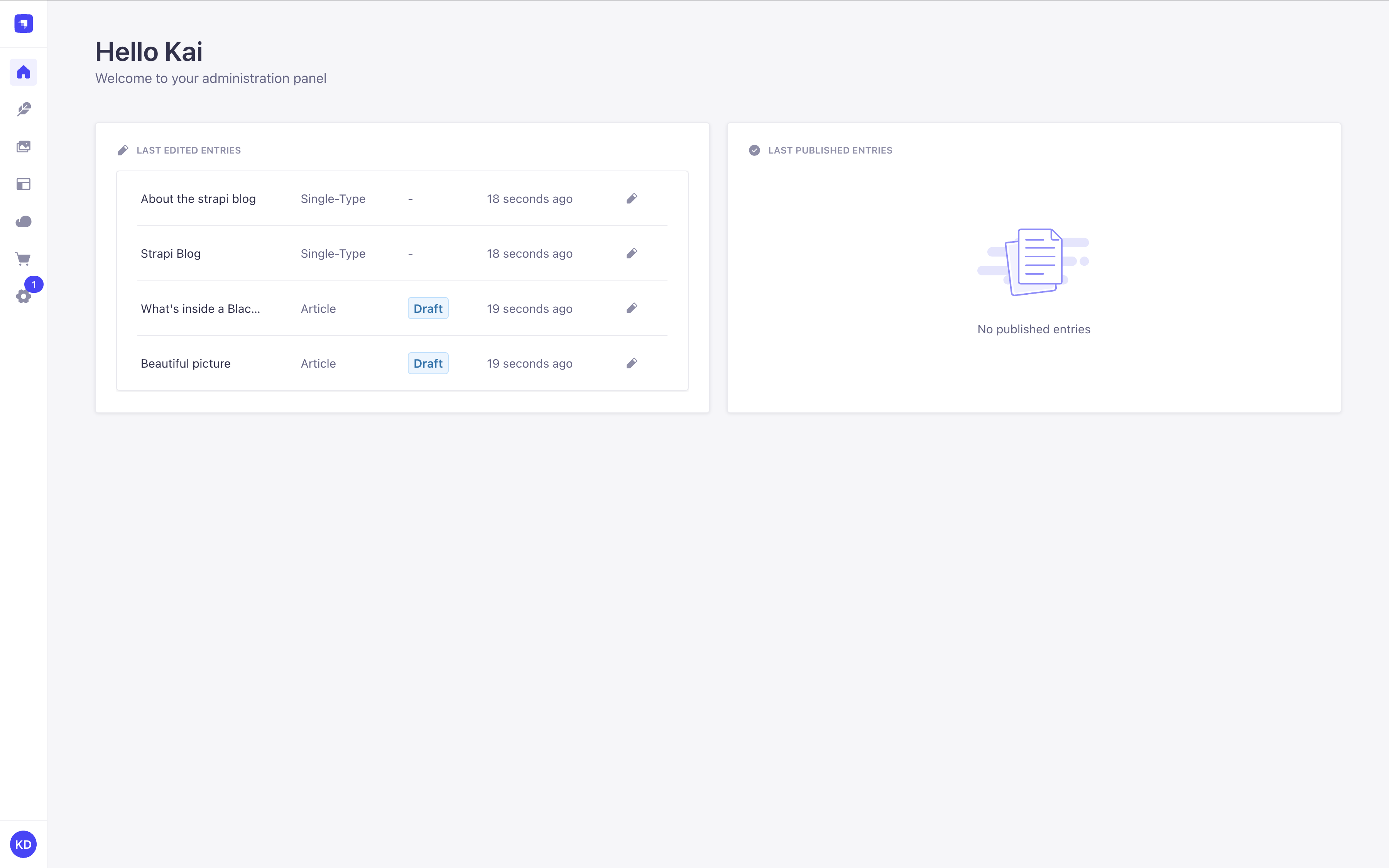
这些默认小组件目前无法移除,但你可以通过创建自己的小组件来自定义首页。
如果你最近创建了一个 Strapi 项目,首页还可能在小组件上方显示一个引导式导览(前提是你尚未跳过它)(详见 管理面板 文档)。
添加自定义小组件
要添加自定义小组件,你可以:
- 从 Marketplace 安装插件
- 或创建并注册你自己的小组件
本页将介绍如何创建并注册你的小组件。
注册自定义小组件
要注册小组件,请使用 app.widgets.register():
- 如果你正在开发插件(推荐方式),请在
index文件的插件register生命周期方法 中, - 或如果你要将小组件添加到单个 Strapi 应用(不使用插件),请在应用的全局
register()生命周期方法 中。
本页的示例将涵盖通过插件注册小组件。如果你在应用的全局 register() 生命周期方法中注册小组件,大部分代码都可复用,只是你不应传入 pluginId 属性。
JavaScript
import pluginId from './pluginId';
import MyWidgetIcon from './components/MyWidgetIcon';

export default {
  register(app) {
    // Register the plugin itself
    app.registerPlugin({
      id: pluginId,
      name: 'My Plugin',
    });

    // Register a widget for the Homepage
    app.widgets.register({
      icon: MyWidgetIcon,
      title: {
        id: `${pluginId}.widget.title`,
        defaultMessage: 'My Widget',
      },
      component: async () => {
        const component = await import('./components/MyWidget');
        return component.default;
      },
      /**
       * Use this instead if you used a named export for your component
       */
      // component: async () => {
      //   const { Component } = await import('./components/MyWidget');
      //   return Component;
      // },
      id: 'my-custom-widget',
      pluginId: pluginId,
    });
  },

  bootstrap() {},
  // ...
};
TypeScript
import pluginId from './pluginId';
import MyWidgetIcon from './components/MyWidgetIcon';
import type { StrapiApp } from '@strapi/admin/strapi-admin';

export default {
  register(app: StrapiApp) {
    // Register the plugin itself
    app.registerPlugin({
      id: pluginId,
      name: 'My Plugin',
    });

    // Register a widget for the Homepage
    app.widgets.register({
      icon: MyWidgetIcon,
      title: {
        id: `${pluginId}.widget.title`,
        defaultMessage: 'My Widget',
      },
      component: async () => {
        const component = await import('./components/MyWidget');
        return component.default;
      },
      /**
       * Use this instead if you used a named export for your component
       */
      // component: async () => {
      //   const { Component } = await import('./components/MyWidget');
      //   return Component;
      // },
      id: 'my-custom-widget',
      pluginId: pluginId,
    });
  },

  bootstrap() {},
  // ...
};
app.widgets.register API 仅适用于 Strapi 5.13 及以上版本。尝试在更旧版本的 Strapi 上调用该 API 会导致管理面板崩溃。
插件开发者若希望注册小组件,应:
-
在其插件的
package.json中将^5.13.0设为@strapi/strapi的 peerDependency。该 peer 依赖用于 Marketplace 的兼容性检查。 -
或在调用前检查该 API 是否存在:
if ('widgets' in app) {
  // proceed with the registration
}
如果插件的全部用途就是注册小组件,推荐使用 peerDependency 方式。如果插件想添加一个小组件,但其大部分功能在其他地方,则第二种方式更合理。
小组件 API 参考
app.widgets.register() 方法可以接受单个小组件配置对象,或一组配置对象。每个小组件配置对象可以接受以下属性:
| 属性 | 类型 | 说明 | 必填 |
|---|---|---|---|
icon | React.ComponentType | 显示在小组件标题旁的图标组件 | 是 |
title | MessageDescriptor | 支持翻译的小组件标题 | 是 |
component | () => Promise<React.ComponentType> | 返回小组件组件的异步函数 | 是 |
id | string | 小组件的唯一标识符 | 是 |
link | Object | 添加到小组件的可选链接(参见链接对象属性) | 否 |
pluginId | string | 注册该小组件的插件 ID | 否 |
permissions | Permission[] | 查看小组件所需的权限 | 否 |
链接对象属性:
如果你要为小组件添加链接(例如导航到详情视图),可以提供一个 link 对象,其属性如下:
| 属性 | 类型 | 说明 | 必填 |
|---|---|---|---|
label | MessageDescriptor | 链接显示的文本 | 是 |
href | string | 链接应导航到的 URL | 是 |
创建小组件
小组件组件应设计为以紧凑且信息丰富的方式展示内容。
以下是如何实现基础小组件组件:
JavaScript
import React, { useState, useEffect } from 'react';
import { Widget } from '@strapi/admin/strapi-admin';

const MyWidget = () => {
  const [loading, setLoading] = useState(true);
  const [data, setData] = useState(null);
  const [error, setError] = useState(null);

  useEffect(() => {
    // Fetch your data here
    const fetchData = async () => {
      try {
        // Replace with your actual API call
        const response = await fetch('/my-plugin/data');
        const result = await response.json();

        setData(result);
        setLoading(false);
      } catch (err) {
        setError(err);
        setLoading(false);
      }
    };

    fetchData();
  }, []);

  if (loading) {
    return <Widget.Loading />;
  }

  if (error) {
    return <Widget.Error />;
  }

  if (!data || data.length === 0) {
    return <Widget.NoData />;
  }

  return (
    <div>
      {/* Your widget content here */}
      <ul>
        {data.map((item) => (
          <li key={item.id}>{item.name}</li>
        ))}
      </ul>
    </div>
  );
};

export default MyWidget;
TypeScript
import React, { useState, useEffect } from 'react';
import { Widget } from '@strapi/admin/strapi-admin';

interface DataItem {
  id: number;
  name: string;
}

const MyWidget: React.FC = () => {
  const [loading, setLoading] = useState<boolean>(true);
  const [data, setData] = useState<DataItem[] | null>(null);
  const [error, setError] = useState<Error | null>(null);

  useEffect(() => {
    // Fetch your data here
    const fetchData = async () => {
      try {
        // Replace with your actual API call
        const response = await fetch('/my-plugin/data');
        const result = await response.json();

        setData(result);
        setLoading(false);
      } catch (err) {
        setError(err instanceof Error ? err : new Error(String(err)));
        setLoading(false);
      }
    };

    fetchData();
  }, []);

  if (loading) {
    return <Widget.Loading />;
  }

  if (error) {
    return <Widget.Error />;
  }

  if (!data || data.length === 0) {
    return <Widget.NoData />;
  }

  return (
    <div>
      {/* Your widget content here */}
      <ul>
        {data.map((item) => (
          <li key={item.id}>{item.name}</li>
        ))}
      </ul>
    </div>
  );
};

export default MyWidget;
为简单起见,以下示例直接在 useEffect hook 中发起数据获取。虽然这种方式可用于演示,但未必符合生产环境的最佳实践。
如需更稳健的方案,请考虑 React 文档 中推荐的替代方式。如果你想集成数据获取库,我们推荐使用 TanStackQuery。
数据管理:
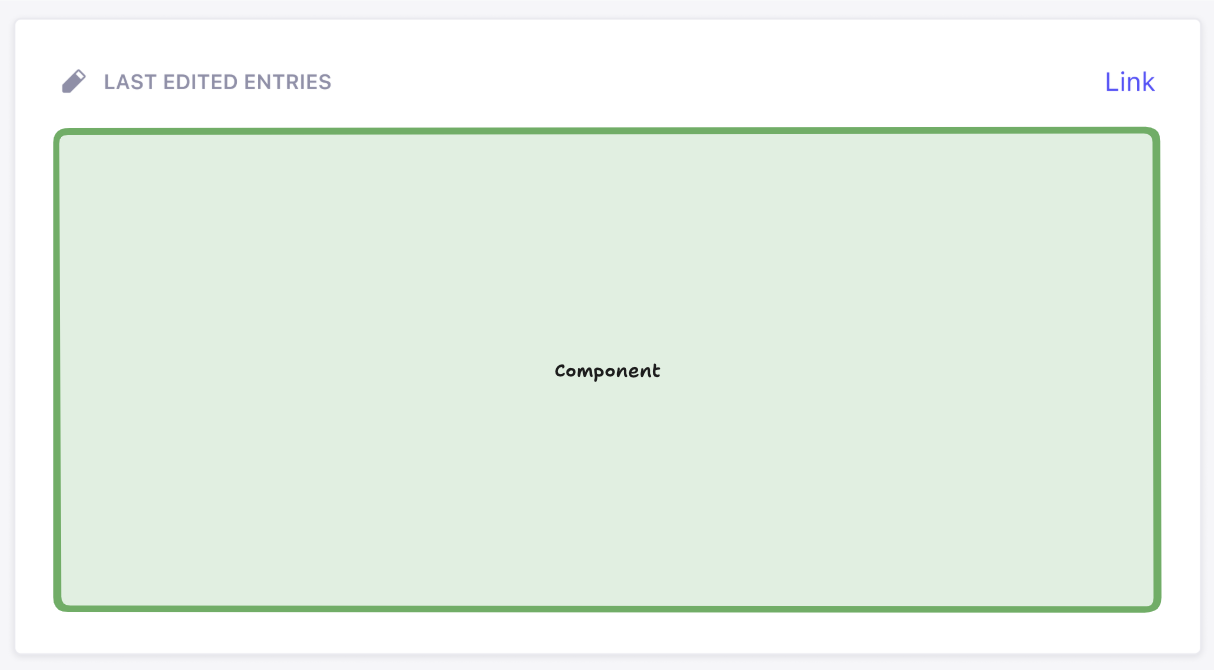
上图中的绿色方框代表用户 React 组件(来自 API 中的 widget.component)被渲染的区域。你可以在该方框内渲染任意内容。但该方框之外的内容则由 Strapi 渲染,以此确保管理面板整体设计的一致性。API 中提供的 icon、title 和 link(可选)属性用于显示小组件。
小组件辅助组件参考
Strapi 提供了若干辅助组件,以保持各小组件一致的用户体验:
| 组件 | 说明 | 用法 |
|---|---|---|
Widget.Loading | 显示加载 spinner 与提示 | 数据获取时 |
Widget.Error | 显示错误状态 | 发生错误时 |
Widget.NoData | 无可用数据时显示 | 小组件无数据可显示时 |
Widget.NoPermissions | 当用户缺少所需权限时显示 | 用户无法访问小组件时 |
这些组件有助于在不同小组件之间保持一致的视觉风格。
你可以不带子元素渲染这些组件以使用默认文案:<Widget.Error />
也可以传入子元素来覆盖默认文案并指定你自己的措辞:<Widget.Error>你的自定义错误消息</Widget.Error>。
示例:添加内容指标小组件
以下示例完整展示了如何创建一个内容指标小组件,用于显示 Strapi 应用中每个内容类型的条目数量。
最终效果在你的管理面板 首页中将如下所示:
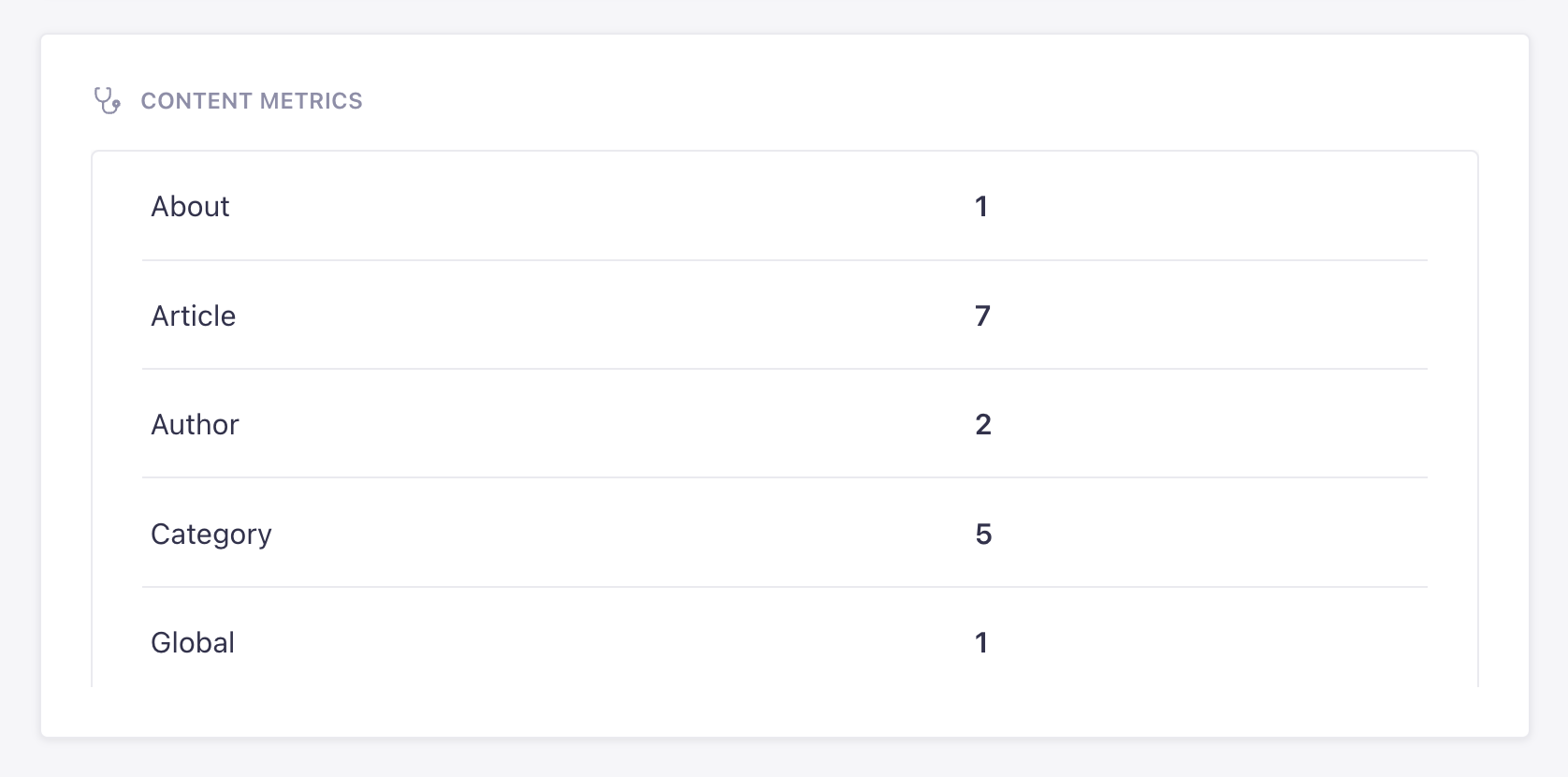
该小组件会显示 Strapi 在你安装时提供 --example 标志后自动生成的示例内容类型的计数(详见 CLI 安装选项)。
可通过以下方式将该小组件添加到 Strapi:
- 创建一个 "content-metrics" 插件(详见 插件创建 文档)
- 复用下面提供的代码示例。
如果你更喜欢动手实践,可以复用以下 CodeSandbox 链接。
JavaScript
以下文件注册了插件和小组件:
import { PLUGIN_ID } from './pluginId';
import { Initializer } from './components/Initializer';
import { PluginIcon } from './components/PluginIcon';
import { Stethoscope } from '@strapi/icons'

export default {
  register(app) {
    app.addMenuLink({
      to: `plugins/${PLUGIN_ID}`,
      icon: PluginIcon,
      intlLabel: {
        id: `${PLUGIN_ID}.plugin.name`,
        defaultMessage: PLUGIN_ID,
      },
      Component: () => import('./pages/App'),
    });

    app.registerPlugin({
      id: PLUGIN_ID,
      initializer: Initializer,
      isReady: false,
      name: PLUGIN_ID,
    });

    // Registers the widget
    app.widgets.register({
      icon: Stethoscope,
      title: {
        id: `${PLUGIN_ID}.widget.metrics.title`,
        defaultMessage: 'Content Metrics',
      },
      component: async () => {
        const component = await import('./components/MetricsWidget');
        return component.default;
      },
      id: 'content-metrics',
      pluginId: PLUGIN_ID,
    });
  },

  async registerTrads({ locales }) {
    return Promise.all(
      locales.map(async (locale) => {
        try {
          const { default: data } = await import(`./translations/${locale}.json`);
          return { data, locale };
        } catch {
          return { data: {}, locale };
        }
      })
    );
  },

  bootstrap() {},
};
以下文件定义了小组件的组件及其逻辑。它接入了我们为插件创建的特定控制器和路由:
import React, { useState, useEffect } from 'react';
import { Table, Tbody, Tr, Td, Typography, Box } from '@strapi/design-system';
import { Widget } from '@strapi/admin/strapi-admin'

const MetricsWidget = () => {
  const [loading, setLoading] = useState(true);
  const [metrics, setMetrics] = useState(null);
  const [error, setError] = useState(null);

  useEffect(() => {
    const fetchMetrics = async () => {
      try {
        const response = await fetch('/api/content-metrics/count');
        const data = await response.json();

        console.log("data:", data);

        const formattedData = {};

        if (data && typeof data === 'object') {
          Object.keys(data).forEach(key => {
            const value = data[key];
            formattedData[key] = typeof value === 'number' ? value : String(value);
          });
        }

        setMetrics(formattedData);
        setLoading(false);
      } catch (err) {
        console.error(err);
        setError(err.message || 'An error occurred');
        setLoading(false);
      }
    };

    fetchMetrics();
  }, []);

  if (loading) {
    return (
      <Widget.Loading />
    );
  }

  if (error) {
    return (
      <Widget.Error />
    );
  }

  if (!metrics || Object.keys(metrics).length === 0) {
    return <Widget.NoData>No content types found</Widget.NoData>;
  }

  return (
    <Table>
      <Tbody>
        {Object.entries(metrics).map(([contentType, count], index) => (
          <Tr key={index}>
            <Td>
              <Typography variant="omega">{String(contentType)}</Typography>
            </Td>
            <Td>
              <Typography variant="omega" fontWeight="bold">{String(count)}</Typography>
            </Td>
          </Tr>
        ))}
      </Tbody>
    </Table>
  );
};

export default MetricsWidget;
以下文件定义了一个统计所有内容类型的自定义控制器:
'use strict';
module.exports = ({ strapi }) => ({
  async getContentCounts(ctx) {
    try {
      // Get all content types
      const contentTypes = Object.keys(strapi.contentTypes)
        .filter(uid => uid.startsWith('api::'))
        .reduce((acc, uid) => {
          const contentType = strapi.contentTypes[uid];
          acc[contentType.info.displayName || uid] = 0;
          return acc;
        }, {});

      // Count entities for each content type
      for (const [name, _] of Object.entries(contentTypes)) {
        const uid = Object.keys(strapi.contentTypes)
          .find(key =>
            strapi.contentTypes[key].info.displayName === name || key === name
          );

        if (uid) {
          // Using the count() method from the Document Service API
          const count = await strapi.documents(uid).count();
          contentTypes[name] = count;
        }
      }

      ctx.body = contentTypes;
    } catch (err) {
      ctx.throw(500, err);
    }
  }
});
以下文件确保 metrics 控制器可通过自定义的 /count 路由访问:
export default {
  'content-api': {
    type: 'content-api',
    routes: [
      {
        method: 'GET',
        path: '/count',
        handler: 'metrics.getContentCounts',
        config: {
          policies: [],
        },
      },
    ],
  },
};
TypeScript
以下文件注册了插件和小组件:
import { PLUGIN_ID } from './pluginId';
import { Initializer } from './components/Initializer';
import { PluginIcon } from './components/PluginIcon';
import { Stethoscope } from '@strapi/icons'

export default {
  register(app) {
    app.addMenuLink({
      to: `plugins/${PLUGIN_ID}`,
      icon: PluginIcon,
      intlLabel: {
        id: `${PLUGIN_ID}.plugin.name`,
        defaultMessage: PLUGIN_ID,
      },
      Component: () => import('./pages/App'),
    });

    app.registerPlugin({
      id: PLUGIN_ID,
      initializer: Initializer,
      isReady: false,
      name: PLUGIN_ID,
    });

    // Registers the widget
    app.widgets.register({
      icon: Stethoscope,
      title: {
        id: `${PLUGIN_ID}.widget.metrics.title`,
        defaultMessage: 'Content Metrics',
      },
      component: async () => {
        const component = await import('./components/MetricsWidget');
        return component.default;
      },
      id: 'content-metrics',
      pluginId: PLUGIN_ID,
    });
  },

  async registerTrads({ locales }) {
    return Promise.all(
      locales.map(async (locale) => {
        try {
          const { default: data } = await import(`./translations/${locale}.json`);
          return { data, locale };
        } catch {
          return { data: {}, locale };
        }
      })
    );
  },

  bootstrap() {},
};
以下文件定义了小组件的组件及其逻辑。它接入了我们为插件创建的特定控制器和路由:
import React, { useState, useEffect } from 'react';
import { Table, Tbody, Tr, Td, Typography, Box } from '@strapi/design-system';
import { Widget } from '@strapi/admin/strapi-admin'

const MetricsWidget = () => {
  const [loading, setLoading] = useState(true);
  const [metrics, setMetrics] = useState(null);
  const [error, setError] = useState(null);

  useEffect(() => {
    const fetchMetrics = async () => {
      try {
        const response = await fetch('/api/content-metrics/count');
        const data = await response.json();

        console.log("data:", data);

        const formattedData = {};

        if (data && typeof data === 'object') {
          Object.keys(data).forEach(key => {
            const value = data[key];
            formattedData[key] = typeof value === 'number' ? value : String(value);
          });
        }

        setMetrics(formattedData);
        setLoading(false);
      } catch (err) {
        console.error(err);
        setError(err.message || 'An error occurred');
        setLoading(false);
      }
    };

    fetchMetrics();
  }, []);

  if (loading) {
    return (
      <Widget.Loading />
    );
  }

  if (error) {
    return (
      <Widget.Error />
    );
  }

  if (!metrics || Object.keys(metrics).length === 0) {
    return <Widget.NoData>No content types found</Widget.NoData>;
  }

  return (
    <Table>
      <Tbody>
        {Object.entries(metrics).map(([contentType, count], index) => (
          <Tr key={index}>
            <Td>
              <Typography variant="omega">{String(contentType)}</Typography>
            </Td>
            <Td>
              <Typography variant="omega" fontWeight="bold">{String(count)}</Typography>
            </Td>
          </Tr>
        ))}
      </Tbody>
    </Table>
  );
};

export default MetricsWidget;
以下文件定义了一个统计所有内容类型的自定义控制器:
'use strict';
module.exports = ({ strapi }) => ({
  async getContentCounts(ctx) {
    try {
      // Get all content types
      const contentTypes = Object.keys(strapi.contentTypes)
        .filter(uid => uid.startsWith('api::'))
        .reduce((acc, uid) => {
          const contentType = strapi.contentTypes[uid];
          acc[contentType.info.displayName || uid] = 0;
          return acc;
        }, {});

      // Count entities for each content type using Document Service
      for (const [name, _] of Object.entries(contentTypes)) {
        const uid = Object.keys(strapi.contentTypes)
          .find(key =>
            strapi.contentTypes[key].info.displayName === name || key === name
          );

        if (uid) {
          // Using the count() method from Document Service instead of strapi.db.query
          const count = await strapi.documents(uid).count();
          contentTypes[name] = count;
        }
      }

      ctx.body = contentTypes;
    } catch (err) {
      ctx.throw(500, err);
    }
  }
});
以下文件确保 metrics 控制器可通过自定义的 /count 路由访问:
export default {
  'content-api': {
    type: 'content-api',
    routes: [
      {
        method: 'GET',
        path: '/count',
        handler: 'metrics.getContentCounts',
        config: {
          policies: [],
        },
      },
    ],
  },
};