
如何通过 Strapi 插件将数据从服务端传递到管理面板
页面摘要: 通过创建自定义 admin 路由,并使用
getFetchClientAPI 从管理面板组件请求数据,即可将 Strapi 插件服务端的数据传递到管理面板。
Strapi 是 headless(无头) 的。管理面板与完全独立的服务端相分离。
开发 Strapi 插件 时,你可能希望将数据从 /server 文件夹传递到 /admin 文件夹。在 /server 文件夹中,你可以访问 Strapi 对象并进行数据库查询,而在 /admin 文件夹中则无法做到这些。
将数据从 /server 文件夹传递到 /admin 文件夹,可以使用管理面板内置的 fetch 客户端:
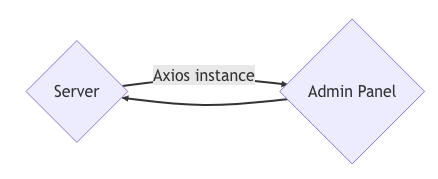
要将数据从 /server 文件夹传递到 /admin 文件夹,你首先需要创建自定义 admin 路由,然后在管理面板中获取返回的数据。
创建自定义 admin 路由
admin 路由与你为任意控制器创建的路由类似,区别在于 type: 'admin' 声明会将它们从通用 API 路由器中隐藏,并允许你从管理面板访问它们。
以下代码将为 my-plugin 插件声明一个自定义 admin 路由:
module.exports = {
  'pass-data': {
    type: 'admin',
    routes: [
      {
        method: 'GET',
        path: '/pass-data',
        handler: 'myPluginContentType.index',
        config: {
          policies: [],
          auth: false,
        },
      },
    ]
  }
  // ...
};
当你向 /my-plugin/pass-data URL 端点发送 GET 请求时,该路由会调用 myPluginContentType 控制器的 index 方法。
我们来创建一个仅返回一段简单文本的基础自定义控制器:
'use strict';

module.exports = {
  async index(ctx) {
    ctx.body = 'You are in the my-plugin-content-type controller!';
  }
}
这意味着,当向 /my-plugin/pass-data URL 端点发送 GET 请求时,响应中应返回 You are in the my-plugin-content-type controller! 这段文本。
在管理面板中获取数据
现在,从管理面板组件向我们定义了自定义路由 /my-plugin/pass-data 的端点发送的任何请求,都应返回该自定义控制器返回的文本内容。
例如,如果你创建一个 /admin/src/api/foobar.js 文件,并复制粘贴以下代码示例:
import { getFetchClient } from '@strapi/strapi/admin';

const { get } = getFetchClient();

const foobarRequests = {
  getFoobar: async () => {
    const { data } = await get('/my-plugin/pass-data');
    return data;
  },
};
export default foobarRequests;
你就可以在管理面板组件的代码中使用 foobarRequests.getFoobar(),并让它随数据返回 You are in the my-plugin-content-type controller! 这段文本。
例如,在 React 组件内部,你可以使用 useEffect 在组件初始化后获取数据:
import foobarRequests from "../../api/foobar";

const [foobar, setFoobar] = useState([]);
// …
useEffect(() => {
  foobarRequests.getFoobar().then(data => {
    setFoobar(data);
  });
}, [setFoobar]);
// …
这会将 You are in the my-plugin-content-type controller! 这段文本设置到组件 state 的 foobar 数据中。